The nBrain platform · The Centralized AI Brain

One private AI platform for your whole company. Your data, your models, your rules, inside your own environment.

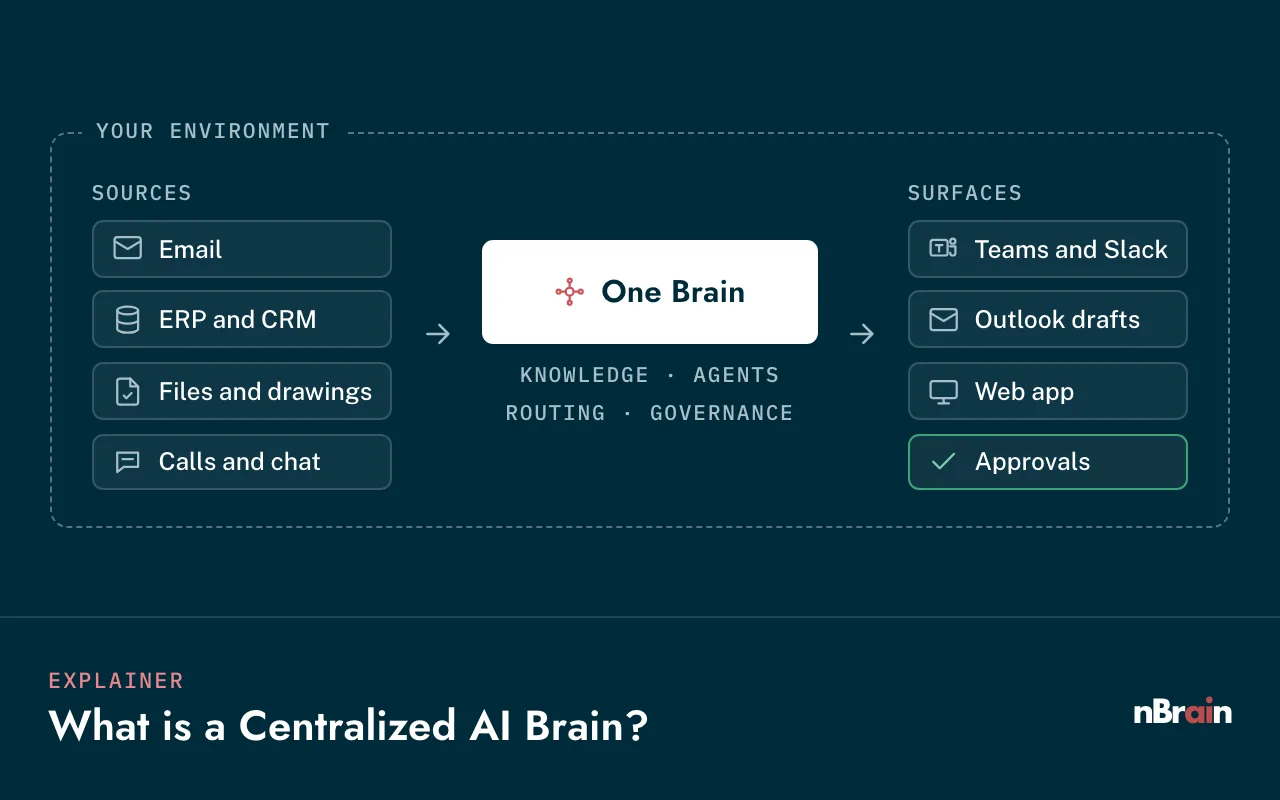
The Brain connects every system you run into one knowledge layer, learns how your company works, puts agents to work in every department, and routes each task to the right model. It runs in your cloud, on your servers, or fully air-gapped, and every part of it belongs to you.

GPT-6 Astra, Claude Opus 5.5, Gemini 4 Argon, and open source Your cloud, on-prem, or air-gapped Builds start at $40,000
YOUR PRIVATE ENVIRONMENT · YOUR CLOUD OR ON-PREMYOUR DATA & SYSTEMSTEAMS IT SERVESERPCRMEmailFiles & documentsCalls & meetingsMicrosoft / GoogleFinanceOperationsSalesEngineeringHRLeadershipNBRAINYour CompanyBrainPermissionsApprovalsAudit trailGPT-6 AstraClaude Opus 5.5Gemini 4 ArgonOpen sourceMODELS IT ROUTES TO, TASK BY TASKYOUR PRIVATE ENVIRONMENTYOUR DATA & SYSTEMSERP & CRMEmail & filesMeetingsNBRAINYour CompanyBrainPermissionsApprovalsAudit trailFinanceOperationsSalesTEAMS IT SERVESMODELS IT ROUTES TO, TASK BY TASKGPT-6 AstraClaude Opus 5.5Gemini 4 ArgonOpen source
What the Centralized AI Brain is

A Centralized AI Brain is one private platform that holds what your company knows, remembers how your people work, and puts AI agents to work on real tasks, under your permissions, in your environment.

Most companies end up with AI sprawl: a ChatGPT subscription here, a Copilot there, a separate AI tool for sales, another for support. None of them share what they learn, none of them see the whole business, and none of them belong to you.

The Brain is the opposite: one knowledge layer, one orchestration layer, many surfaces. Every team uses the same Brain, but each one meets it where it already works, in Slack, Teams, email, a web app, or inside the systems they run. The more workflows you connect, the more it knows, and the faster the next one ships.

Read the Centralized AI Brain explainer →
Not thisThe Brain
A chatbot with a single promptA platform of agents, knowledge, memory, and controls
Seats you rent per person, per monthA platform built inside your company, priced as a build
One vendor's model and one vendor's appsEvery frontier model, plus open source, routed task by task
Your prompts on someone else's serversRuns in your cloud, on-prem, or air-gapped
Starts over when you switch toolsKeeps everything it learns, year after year
A pilot that never reaches daily workLive on real work, with each role trained
01 · Know

Knowledge layer

Your documents, email, meetings, and systems, searchable with citations.

How it learns →
02 · Remember

Memory

How each team writes, decides, and approves, kept and curated over time.

See it in the Brain ↓
03 · Act

Agents

Purpose-built workers with a role, tools, and guardrails, one per job.

See agents ↓
04 · Route

Model router

Every leading model, with the best one picked for each task on quality, speed, and cost.

The router ↓
05 · Govern

Controls

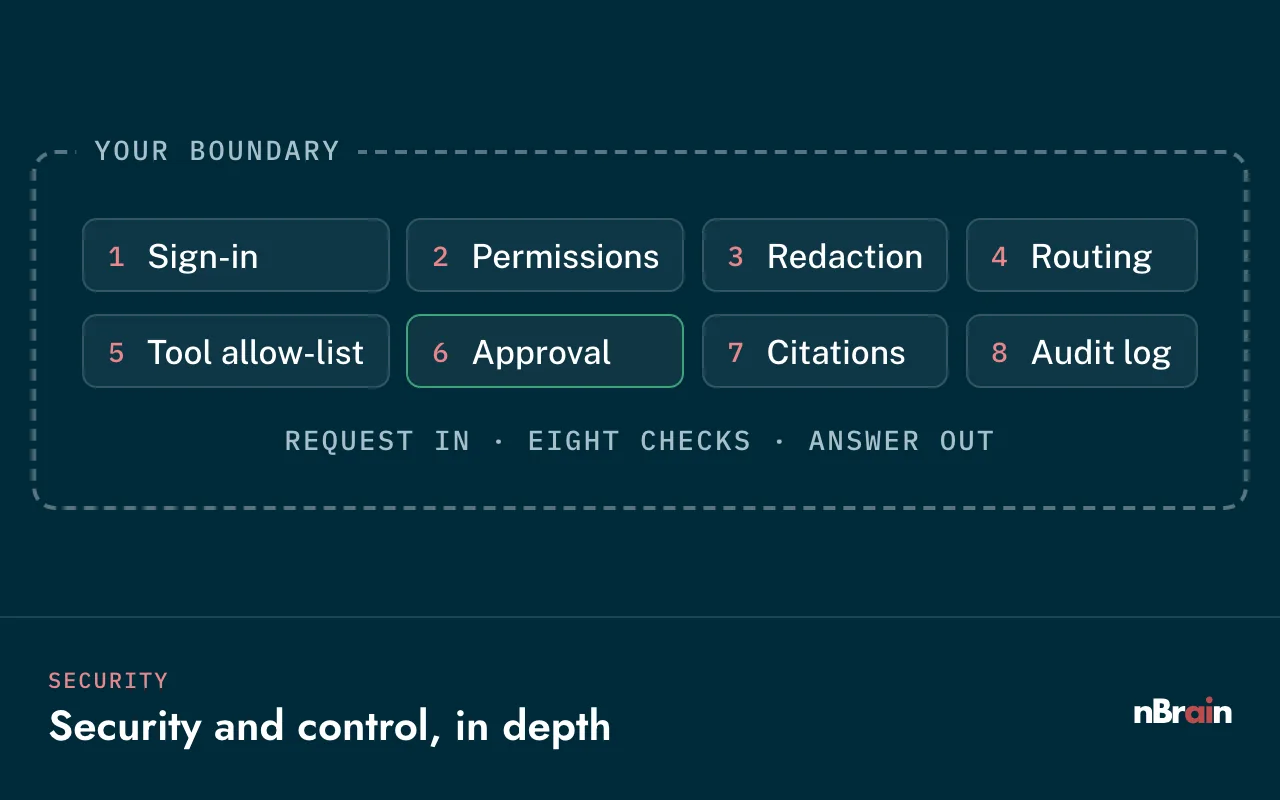
Permissions, approval gates, and a full audit trail on every step.

Security →
The problem

Your Staff Already Uses AI But Is It an Asset? Are You Controlling It? Can You Scale It?

ChatGPT, Copilot, and SaaS AI tools are built for everyone, not around your data, your rules, or your budget. The same four problems show up in almost every company we talk to. Select a number to see each one.

Where your AI lives todayNumbers mark the four problems
YOUR COMPANYFinanceSalesLegalEngineeringOperationsIDLE SEATHRIDLE SEATWHAT GETS PASTED OUTContracts, financials,customer files, source codeOUTSIDE · THEIR SERVERS, THEIR RULES12 FLOWS OUTNONE LOGGEDChatGPT (personal)GeminiMeeting notetakerBrowser plug-inSales email AICopilotClaude.aiWriting assistantPDF summarizerFree trialPER-SEAT INVOICEEach tool, each seat, each month
YOUR COMPANYFinanceSalesLegalEngineeringOperations, HRIDLE SEATSOUTSIDE · THEIR RULESChatGPTCopilotGeminiClaude.aiNotetaker+5 morePER-SEAT INVOICE
01Privacy & security

Your data is currently leaving the building.

Today
Prompts and files land on vendor servers and in personal accounts no one sees.
With nBrain
Runs in your cloud or air-gapped, and never trains public models.
Your cloud · On-prem · Air-gapped
02Cost

You pay per employee, per month, forever.

Today
Seat licenses that grow with headcount, plus a separate tool for each department.
With nBrain
One platform for every team, no seat licenses, routine work on open-source models.
~65% lower model usage costEstimate your return →
03Control

Your business is being controlled by other companies.

Today
The vendor sets the models, the data rules, the guardrails, and the price.
With nBrain
You set the permissions, the guardrails, and which models see which data.
Audit logs for ITAR · CMMC · HIPAA
04Adoption

Many team members aren't using AI correctly, if at all.

Today
Seats sit idle, and pilots stall before they reach daily work.
With nBrain
We train each role and stay through adoption, inside Slack, Teams, and email.
32,000+ client interactions studiedRead The Other 50% →

Every line on that map ends outside your company. See what changes when it all comes back inside ↓

The solution

One private Brain solves all four problems.

Your data stays inside your own boundary. A model router replaces per-employee pricing. Permissions, approvals, and an audit trail keep your business in your hands. And the Brain works inside the tools your team already uses, preparing the next step instead of waiting for a prompt.

Where your AI lives with nBrainHover any part of the Brain to see how it works
Privacy

Your cloud, your boundary

The whole Brain runs inside your cloud or on your own servers. Your data stays in the building and never trains public models.

Cost

Token Speed & Cost Optimization

Each task goes to the right model: GPT-6 Astra, Claude Opus 5.5, Gemini 4 Argon, or a private open-source model for routine work. No per-seat licenses, and usage is billed at list price in your accounts.

Control

Sophisticated Permission Controls, Auditability, Built-in Kill Switch

Access mirrors your roles, a person approves anything that matters, and every action is logged. You set the rules, not a vendor.

Adoption

Inside the tools they already use

The Brain works in Slack, Teams, email, and your CRM, and proposes the next step instead of waiting for a prompt, so people use it without changing how they work.

What changes

nBrain turns what your company knows into work that gets done.

  1. Answers grounded in your business

    Ask in plain English across every system you run. Pre-meeting briefs in minutes. Decades of expertise searchable, with citations back to the source, before the people who hold it retire.

  2. Work that moves itself, with a human on the trigger

    The Brain holds an invoice that doesn't match its PO, checks which jobs are clear to build, and drafts the follow-up. Nothing that matters ships until a person clicks Approve.

  3. Intelligence that compounds

    Every new workflow reuses the same data, permissions, and memory, so the second one ships faster than the first, and the Brain gets sharper with every month it runs.

  4. Adoption that sticks

    We train each role on its own work and stay through adoption, so the Brain becomes part of the day instead of another tab nobody opens.

A production planner reviewing the morning build list on a laptop above the factory floor
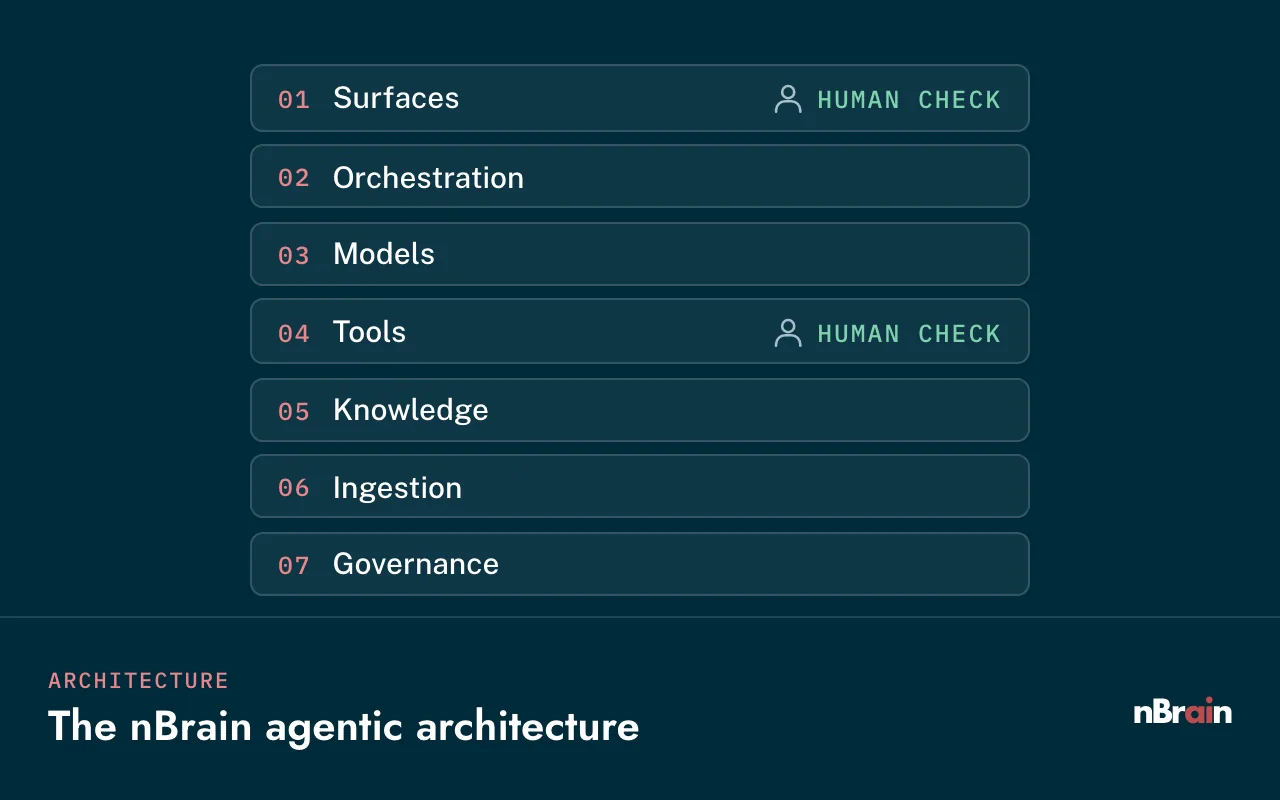
An agentic platform

An agentic platform, not a bunch of siloed agents.

One centralized AI serves every AI use case in your company. Each agent is a purpose-built worker with a role, tools, the right model, and guardrails, but none of them stands alone: they all run on the same Brain, sharing its knowledge, memory, permissions, and audit trail. Nothing gets learned twice, no team works blind to what another knows, and each new use case costs a fraction of the first.

Finance agents

Close faster, and catch the invoice that doesn't match.

Finance agents check every invoice instead of a sample, reconcile accounts before month-end, and explain variances with the records behind them.

  • Invoice and payment verifierMatches each invoice to its PO, receipt, and contract terms, and holds anything that doesn't line up.
  • Month-end close assistantDrafts reconciliations and variance explanations for the controller to review.
  • Collections watcherFlags aging receivables and drafts the reminder in your tone.
Anatomy of an agent
Invoice and payment verifier
Role
Check every incoming invoice against the PO, receipt, and contract before payment.
Tools
Read ERP and AP inbox, read contracts, write to the approval queue.
Memory
Vendor history, past exceptions, and how your team resolved them.
Models
Open-source model for field extraction, a frontier model for exceptions.
Guardrails
Cannot release a payment. Every hold and approval is logged.
Surface
Approval card in Teams or email for the AP lead.
Sales agents

Answer RFQs in a fraction of the time, and walk into every meeting briefed.

Sales agents read the request, pull pricing, past quotes, and specs from your systems, and draft the response. At Regal Technology Partners, a Tier 2 defense manufacturer, the sales team now spends 92% less time on RFQs.

  • RFQ and quote responderReads the RFQ, matches parts and past pricing, and drafts the quote for the rep to send.
  • Pre-meeting briefAccount history, open opportunities, recent emails, and calls, summarized before the meeting.
  • Call follow-up and CRM updaterTurns a recorded call into a recap, CRM update, and follow-up email, ready to approve.
Anatomy of an agent
RFQ and quote responder
Role
Turn an incoming RFQ into a priced, spec-checked draft quote.
Tools
Read the sales inbox, ERP pricing, past quotes, and spec sheets.
Memory
Customer preferences, past wins and losses, and approved terms.
Models
Gemini 4 Argon for drawings in the RFQ, GPT-6 Astra for matching and drafting.
Guardrails
Drafts only. The rep reviews and sends. Margins below your floor are flagged.
Surface
Draft in the rep's inbox, with a summary in Slack or Teams.
Operations agents

Know what's clear to build before the morning meeting.

Operations agents watch materials, orders, and open issues across your ERP and shop-floor systems, and tell the planner what's ready, what's blocked, and why.

  • Production readiness checkerChecks materials, drawings, and open nonconformances for every job on tomorrow's schedule.
  • Supplier and PO trackerSpots late deliveries early and drafts the supplier follow-up.
  • SOP and work-instruction answersPlain-English answers from your procedures, cited to the current revision.
Anatomy of an agent
Production readiness checker
Role
Tell the planner which jobs are clear to build, and what's holding the rest.
Tools
Read ERP, MES, inventory, and the quality system.
Memory
Recurring bottlenecks and how the planner usually resolves them.
Models
Open-source model for the daily check, a frontier model for root cause.
Guardrails
Read-only. It recommends; it never changes the schedule.
Surface
A morning digest in Teams, before the stand-up.
Engineering and quality agents

Ask the drawings and specs, and get the revision cited.

Engineers ask in plain English and get answers from drawings, specifications, test reports, and change history, with a link to the exact document and revision.

  • Technical document Q&ACited answers across specs, drawings, and work instructions, filtered by who is asking.
  • Change impact checkerLists the parts, documents, and open orders an engineering change touches.
  • Cert and first-article checkerCompares supplier certs and inspection data against the PO and drawing.
Anatomy of an agent
Technical document Q&A
Role
Answer engineering questions from controlled documents, with the revision cited.
Tools
Search PLM, document control, and engineering change history.
Memory
Superseded revisions and recurring questions by product line.
Models
Claude Opus 5.5 for long specs, Gemini 4 Argon for drawings, open-weight where data must stay local.
Guardrails
Says so when it can't find support. Controlled documents only for authorized users.
Surface
The web app and Teams, with a link to the source file.
Customer service agents

Every call reviewed and every ticket triaged, not a sample.

Service agents read every ticket and score every call against your standards, so supervisors coach from the full picture instead of a few spot checks.

  • Ticket triage and reply draftsRoutes each ticket to the right queue and drafts a reply from your knowledge base.
  • Call quality reviewerScores every recorded call for accuracy, tone, and required disclosures.
  • Knowledge base updaterSpots the questions your articles don't answer and drafts the new article.
Anatomy of an agent
Call quality reviewer
Role
Score every call against your rubric and surface the ones a supervisor should hear.
Tools
Read call recordings and transcripts, the CRM, and your scoring rubric.
Memory
Each agent's trends and the coaching notes from past reviews.
Models
Speech-to-text, then an open-source model for scoring at volume.
Guardrails
Scores are advisory. Personal data stays in your environment.
Surface
A weekly supervisor dashboard and Slack alerts.
HR agents

Answer the policy question once, correctly, for everyone.

HR agents answer employee questions from your handbook and benefits documents, prepare onboarding plans, and draft the paperwork, all under strict access rules.

  • Policy and benefits answersCited answers from your handbook, so HR stops answering the same question daily.
  • Onboarding plan builderA first-30-days plan per role, with accounts, training, and introductions listed.
  • Job description and interview kitsDrafted from the role, the team, and what worked in past hires.
Anatomy of an agent
Policy and benefits answers
Role
Answer employee questions from approved HR documents only.
Tools
Search the handbook, benefits guides, and the HR policy library.
Memory
Which questions come up most, to keep the documents current.
Models
An open-source model for most questions, a frontier model for edge cases.
Guardrails
Never reads personnel files. Hands sensitive questions to a person.
Surface
Slack or Teams, where employees already ask.
Leadership agents

Ask the whole business a question, and get one answer.

Leadership agents pull from finance, sales, operations, and the inbox at once, so owners see what changed this week without waiting for five reports.

  • Weekly business digestPipeline, cash, operations, and open risks, summarized every Monday.
  • Board and investor report draftsBuilt from the source numbers, with every figure traceable.
  • Ask the business"Which customers grew fastest this quarter, and why?" answered across systems.
Anatomy of an agent
Weekly business digest
Role
Brief the owner on what changed across the business this week.
Tools
Read the ERP, CRM, accounting, and leadership inbox.
Memory
The metrics this owner watches and the questions they asked last week.
Models
GPT-6 Astra for analysis across sources, open source for the routine roll-ups.
Guardrails
Every figure links to its source record.
Surface
A scheduled email every Monday, and follow-up questions in chat.
Model router

Connected to every leading model. It knows which one is best for each task.

The Brain connects to GPT-6 Astra, Claude Opus 5.5, Gemini 4 Argon, and open-source models such as Llama, Mistral, or Qwen running privately. Its router reads each request for intent and difficulty and weighs output quality, speed, and cost before it picks a model. Hard reasoning gets the strongest model, long documents get the longest context, and routine, high-volume work runs on faster, cheaper models, so the cost per task drops by about 65%.

  • You decide which models see which dataSensitive work can be pinned to models running inside your environment. The router enforces the rule on every call.
  • New models plug in without a rebuildWhen a better model ships, it becomes another route. Agents, memory, and permissions stay as they are.
  • Usage at list price, in your own accountsModel and cloud costs are billed directly to you at list price, with no markup, and step budgets and spend alerts keep usage in check.
  • Resilient by designIf a provider has an outage, work fails over to another approved model instead of stopping.
The taskRouted toWhy
Summarize a call, tag an email, pull fields from an invoiceOpen source, privateHigh volume and routine. Cheapest per task, and the data stays put.
Plan a multi-step task, write and check codeGPT-6 AstraStrong general reasoning and tool use.
Compare two versions of a 300-page contractClaude Opus 5.5Long-context analysis and careful writing.
Read site photos, scanned drawings, or a video walkthroughGemini 4 ArgonMulti-modal input.
Anything touching data you've marked restrictedOpen-weight, in your environmentYour policy decides, and the router enforces it.
65%lower cost per AI task through model routing, compared with sending every task to a single frontier model.
Proactive AI

AI that doesn't wait on you. It's always working.

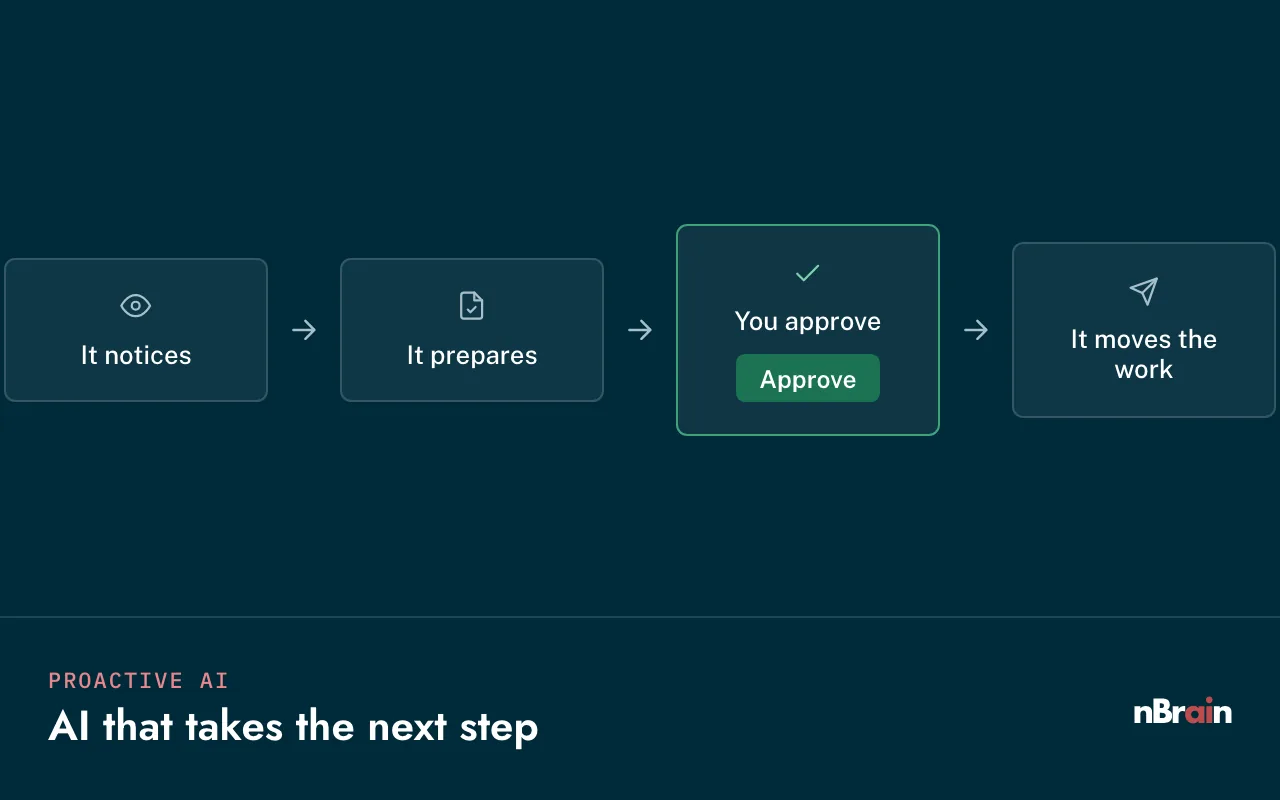
Most AI sits idle until someone types a prompt. Your Brain keeps working in the background: it notices what needs to happen next, prepares the work, and moves it forward once a person approves.

See proactive AI in action
Most AI · waits for a prompt
  1. You ask
  2. It answers
  3. You do the rest
  4. Then it waits
Your Brain · takes the next step
  1. It noticesCall endsInvoice flagRenewal due
  2. It preparesRecap, CRM, follow-up
  3. You approveOne click
  4. It moves the workSent and logged
Always working
Events

Something happens

  • A customer call ends
  • An invoice arrives that fails a check
  • A new RFQ lands in the sales inbox
Schedules

It's time

  • The Monday business digest
  • Month-end close preparation
  • Tomorrow's build list, every evening
Thresholds

Something crosses a line

  • A renewal date gets close
  • Inventory drops below its reorder point
  • A margin falls below your floor
Surfaces

One Brain, wherever your team already works.

People don't adopt another app. They adopt help that shows up where they already are. The same Brain, with the same knowledge, permissions, and audit trail, meets each team in the surface that fits its day.

Chat

Slack

Ask in a channel or a DM, get cited answers, and approve actions from the thread.

Chat

Microsoft Teams

The same Brain inside Teams, with approval cards for the people who sign off.

Inbox

Email

Drafted replies, recaps, and digests in Outlook or Gmail, sent only when a person says so.

Workspace

Web app

Chat with live documents, an approval queue, a memory panel, and dashboards for each team.

Developers

API and embedded widgets

API endpoints for any system in your stack, and assistants embedded in your own portals.

On the go

Mobile

Answers and approvals from your phone, in Slack, Teams, or email, for people on the floor, in the field, or between meetings.

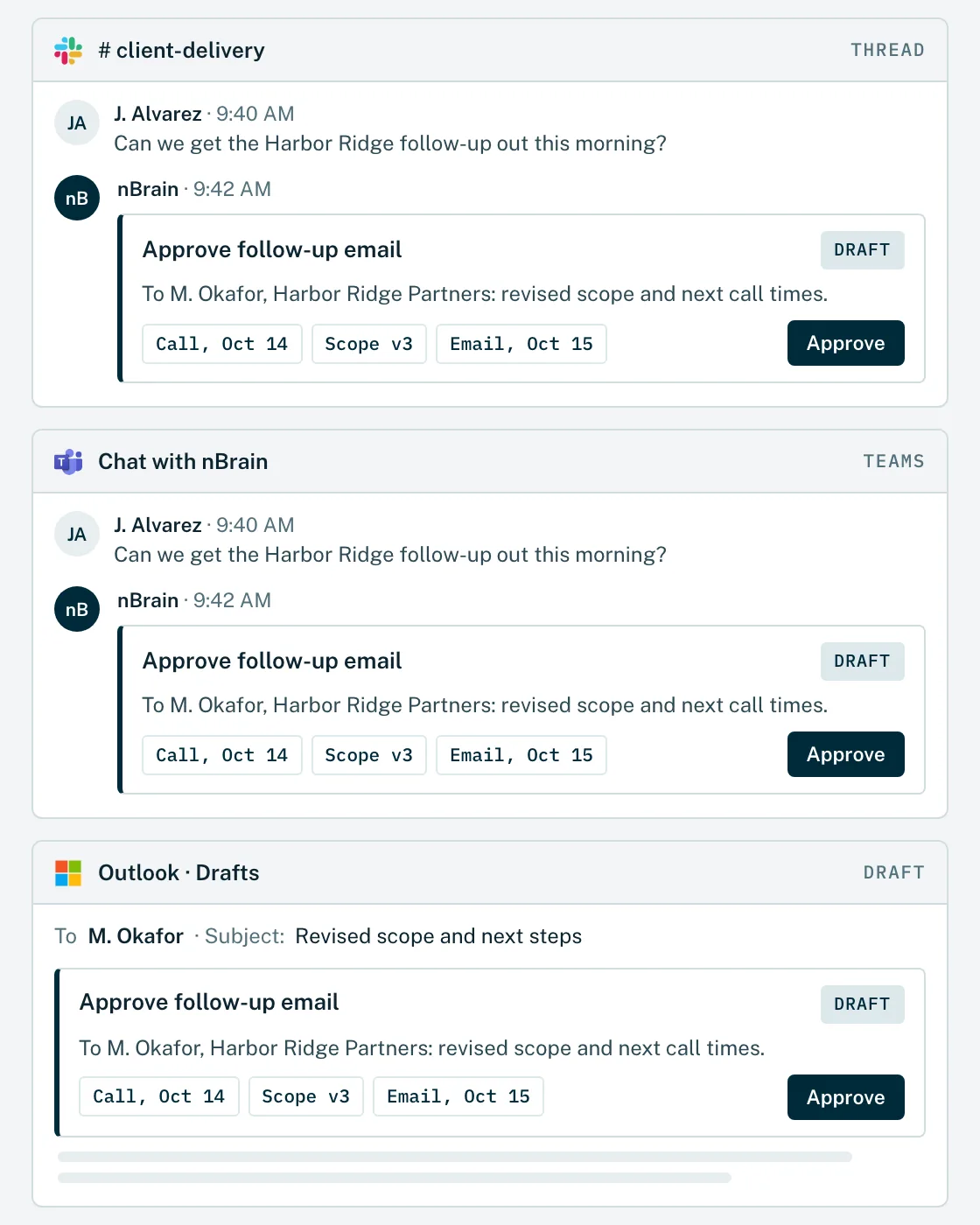
Example of the same Approve follow-up email card, with identical source chips and an Approve button, shown in Slack, Microsoft Teams and an Outlook draft.
Integrations

If it can connect, your Brain can use it.

Your Brain connects to the systems you already run through native connectors, APIs, webhooks, and direct database connections. Anything we don't have a connector for yet gets built as part of your engagement. Access always follows your permissions, and data stays where it lives.

APIs

REST and GraphQL APIs, read and write, with the same access your people have.

Webhooks and events

The Brain reacts the moment something happens: a new order, a ticket, a signed contract.

Databases and warehouses

Direct, read-only by default: SQL Server, Postgres, Snowflake, BigQuery.

Files and email

SharePoint, Google Drive, shared inboxes, and network file shares.

Custom and legacy systems

On-prem ERPs, SFTP drops, and scheduled exports. If it holds data, we can reach it.

Logos are trademarks of their owners and show common systems we connect to.

Deployment options

You decide where your platform lives.

Your cloud, your own servers, or fully disconnected: you choose, based on what your data requires. Most companies run the Brain in a cloud tenant they already operate. Companies with the most sensitive data run it on their own servers or fully disconnected. The Brain, its controls, and its audit trail are the same in all three.

Option 01 · Your cloud

Your AWS, Azure, or Google Cloud tenant

The Brain runs in a cloud account you already operate, under your accounts, your keys, and your network rules. That includes AWS GovCloud (US) and Azure Government for defense and public-sector work.

Models
GPT-6 Astra, Claude Opus 5.5, and Gemini 4 Argon through enterprise endpoints, plus open-source models in your tenant.
Best for
Most companies, including regulated ones.
Option 02 · On-premises

Your data center, your hardware

Installed on servers and GPUs you own, behind your firewall, and run under the controls you already have on site.

Models
Open-source models on your GPUs, plus hosted frontier models only if you approve the connection.
Best for
Data that can't sit in a public cloud.
Option 03 · Fully air-gapped

Disconnected, with no internet

A network with no route to the internet. Nothing calls home and nothing leaves. Scoped per program, including how updates are delivered and approved.

Models
Open-weight models such as Llama, Mistral, or Qwen, running locally.
Best for
ITAR technical data and the most sensitive programs.
The trade-off, stated plainly

GPT-6 Astra, Claude Opus 5.5, and Gemini 4 Argon are hosted services, so they can't run on a network with no internet. An air-gapped Brain uses open-weight models on your own hardware instead. They handle search, cited answers, summaries, and first drafts well, and can trail the frontier models on the hardest reasoning, so we test them on your own documents before go-live and show you where the difference matters.

The long-term payoff

An asset that only gets better over time.

With nBrain, the platform is built inside your company, not rented from a vendor. Every month of learning stays with you and keeps adding up, and each new workflow reuses everything already built, so the Brain is worth more each year it runs.

Owned vs. rented · where the value builds
VALUE TO YOUR COMPANY AS IT LEARNS YOUR BUSINESS AND NEW MODELS PLUG IN → VENDOR UPDATES · SAME FOR EVERY CUSTOMER YOUR COMPANY KNOWLEDGE Your Brain, owned Compounds on your own data Agent sophistication Smarter with every use Rented SaaS Shared with every customer FEEDBACKMEMORYTUNING GPT-6 AstraClaude Opus 5.5Gemini 4 ArgonNext model VALUE TO YOUR COMPANY AS IT LEARNS AND NEW MODELS PLUG IN → Your Brain, owned Agent sophistication Rented SaaS SAME UPDATES, EVERY CUSTOMER FEEDBACKMEMORYTUNING GPT-6 AstraClaude Opus 5.5Gemini 4 ArgonNext model
Your Brain, owned. Your company knowledge (decisions, answers, approvals, history) compounds, and it steps up with every new model, with no rebuild. Agent sophistication. Your agents get smarter with every use: each correction is feedback, they remember past work, and they are tuned on how your team works. Rented SaaS. Improves when the vendor ships, for every customer equally. Your feedback doesn't build agents you own, and the value stays with the vendor. Illustrative, not to scale.

Intelligence that compounds

Every decision, answer, approval, and piece of history the Brain learns stays in it and sharpens the next answer.

An asset you own

It sits on your books, not a vendor's. Its value builds the longer it runs. That is hard to put a number on today, but it is yours.

Better with every new model

GPT-6 Astra, Claude Opus 5.5, Gemini 4 Argon, and whatever ships next plug into the same Brain. No rebuild, and nothing it has learned is lost.

Learning no competitor can rent

Rented AI ships each improvement to every customer, your competitors included. What your Brain learns from your work stays with you.

What "owning it" means, in plain terms
It runs in your accountYour cloud or your servers, not ours.
The code is yoursIt lives in your repository, and you hold the keys.
The data never leavesAnd it never trains anyone else's model.
You choose the modelsSwap in better ones as they ship, at list price.
It keeps running without usYour IT team can take it over at any time.

See exactly what you own →Ownership questions, answered →

How a build works

From first conversation to a Brain your team runs on.

Builds start at $40,000, and a typical build takes about three months. Every Brain is built against a business result, not a feature list, and your team uses it on live work, not a sandbox.

Phase 01
Before the build starts

Discovery

We find the workflows where AI moves revenue, cost, or time, and map the data, systems, and people behind them.

  • Priority workflows, ranked
  • The measure of success
  • Written scope and plan
Phase 02
Inside the build

Foundation build

We stand up the Brain in your environment: sign-in, knowledge layer, router, controls, and the first data sources.

  • Your identity and roles
  • First systems connected
  • Logging and approvals on
Phase 03
Inside the build

First agents live

The first agents go to work on real tasks, and we train each role on its own work.

  • Baseline taken, then measured
  • Role-by-role training
  • Corrections become guidance
Phase 04
After launch

Expand

New agents, surfaces, and systems in your priority order, each reusing the foundation.

  • Next department or module
  • More data sources
  • Proactive triggers
Phase 05
Ongoing

Operate & evolve

We run and improve the Brain with you, swap in better models as they ship, and stay through adoption.

  • Usage and results reviewed
  • New models, no rebuild
  • Your IT team can take it over
What it costs
$40,000
Builds start here. We scope the build with you before anything starts.
~3 months
A typical build, from kickoff to a Brain in daily use.
List price
Running costs in your own cloud and model accounts, billed to you directly, no markup.
~65%
Lower model usage cost, because the router sends routine work to cheaper models.

What we need from you

Our study of 32,000+ client interactions found that successful builds had a named owner, a written definition of done, and testing time in place from kickoff. We ask for four things.

  1. A named owner on your side who can make decisions.
  2. A few hours a week from the people who do the work.
  3. Access to the systems in scope.
  4. A written definition of done, agreed before the build starts.

Results from Brains in production today.

92%
less sales-team time spent on RFQs at Regal Technology Partners, a Tier 2 defense manufacturer
5 months
from first idea to a Brain built and launched across a 200-person manufacturer
65%
lower cost per AI task, because the router sends each task to the right model
33.5%
average increase in employee productivity within six months

Regal Technology Partners is named with permission. Other client names are withheld to protect their confidentiality.

Straight answers

Questions about the platform.

What exactly is a Centralized AI Brain?

One private AI platform for your whole company. It has a knowledge layer built from your documents, email, meetings, and systems; a memory of how your teams work; agents that do specific jobs; a model router that picks the right model for each task; and controls you set, including permissions, approvals, and an audit trail. Every team uses the same Brain through Slack, Teams, email, a web app, or an API.

How is this different from Microsoft Copilot or ChatGPT Enterprise?

Those are strong assistants, rented per seat, and each one mostly sees its own vendor's apps. A Brain connects every system you run, including your ERP, CRM, shop floor, and call recordings, routes each task to the best model across vendors, takes approved actions, and belongs to you. Many clients keep Copilot for Office documents. The Brain is the layer that knows the whole business.

Which AI models does it use, and can we choose?

GPT-6 Astra, Claude Opus 5.5, Gemini 4 Argon, and open-source models such as Llama, Mistral, and Qwen. The router picks the best one for each task, and you decide which models may see which data. When a better model ships, it becomes another route without rebuilding your agents.

What does it cost to build, and to run?

Builds start at $40,000, and a typical build takes about three months. We scope it with you before anything starts. Running costs, meaning your cloud and model usage, are billed directly to your own accounts at list price with no markup, and routing cuts the cost per AI task by about 65%.

Where does it run?

In your AWS, Azure, or Google Cloud tenant (including AWS GovCloud and Azure Government), on servers you own, or fully air-gapped with no internet connection. Your data never trains public models. The security page covers each option in detail.

How long until our team is actually using it?

Inside the build. The foundation and first agents go live on real work during the roughly three-month build, and we train each role as its agents launch. After that, new workflows ship faster because they reuse what's already built.

Does it replace the systems we already run?

No. The Brain slots into your stack. It reads from and, with approval, writes to the systems you already use, and your data stays where it lives. If a system has an API, a webhook, a database, or even a scheduled export, the Brain can use it.

What happens if we stop working with nBrain?

You keep everything: the code in your repository, the data in your environment, and every prompt, agent, and configuration. It runs in your account, so it keeps running, and your IT team can take it over or bring in another partner.

Go deeper

More on how the Brain is built.

See it on your business

Put one private Brain to work across your company.

In one strategy session we map where a Brain would give your people the most time back, which deployment fits your data, and what the first build would include.

Prefer email? hello@nbrain.ai