General contractors · Specialty contractors · Oil & gas operators · Drilling and oilfield services
A private AI Brain built around your jobs, your crews, and your records. From the bid to the daily log to cost-to-complete, answered from your own systems, at the office or in the field.
nBrain builds one private AI Brain on top of your project, accounting, and field systems. Estimators, project managers, superintendents, and drilling engineers ask in plain English and get cited answers and first drafts. It runs in your cloud, on your own servers, or at the edge for sites with little or no connectivity. You own the platform, the data, and everything we build.
Runs in your cloud, on-prem, or at the siteAnswers cited to the document and revisionA person approves anything that leaves the building
The same platform is already running real work for nBrain clients in manufacturing, construction, and the field.
92%
less sales-team time on RFQs at Regal Technology Partners, a Tier 2 defense manufacturer
5 months
from first idea to a Brain built and launched across a 200-person manufacturer
65%
lower cost per AI task, because the orchestrator sends each task to the right model
33.5%
average increase in employee productivity within six months
Results from Brains in production for nBrain clients. Other client names are withheld to protect their confidentiality.
Guide · Private AI for contractors and energy operators
Decades of job records, finally working for the next bid.
Where to start with AI when your knowledge lives in job folders, field notebooks, and the heads of people who are close to retiring: what to connect first, how to handle remote sites, and which workflows return the most hours.
Built for the work contractors and operators actually do.
Each team starts with one costly, everyday job. The Brain does the searching, matching, and first drafts across your systems. Your estimators, PMs, superintendents, and engineers make the calls.
AI for estimating and bids
Price the next job from every job you've already built.
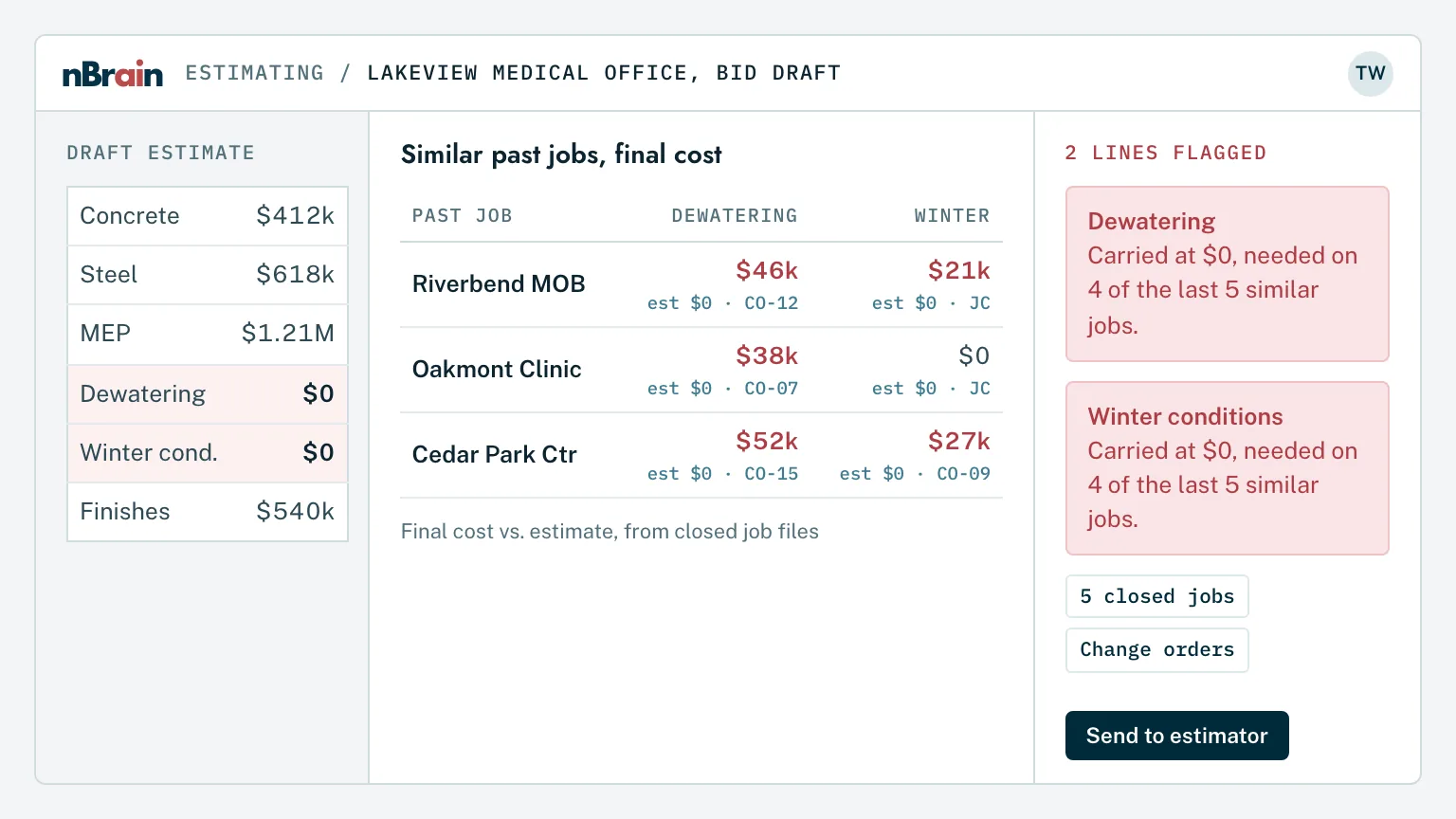
The Brain reads your bid board, past estimates, final job costs, and plans, so an estimator can ask "what did we carry for site work on the last three schools?" and get the answer with the estimates behind it. Before a number goes out, it checks the estimate against the lines your jobs usually need.
Every bid, searchableInvitations, due dates, scopes, and results in one place, by job type, owner, or year.
Estimate versus actualPast estimates compared with what each job really cost, line by line, so the overruns show up before they repeat.
Missing-line checksLines your jobs usually need but the estimate carries at zero, such as permitting or contingent work, flagged for the estimator.
Why the check matters. In one drilling contractor's records, two recent jobs ran 67% and 87% over estimate. Both overruns came from lines the estimate template carried at zero "if required." Your estimators still set the price. The Brain makes sure they see the pattern first.
Ask the drawings and specs a question. Get the answer from the current revision.
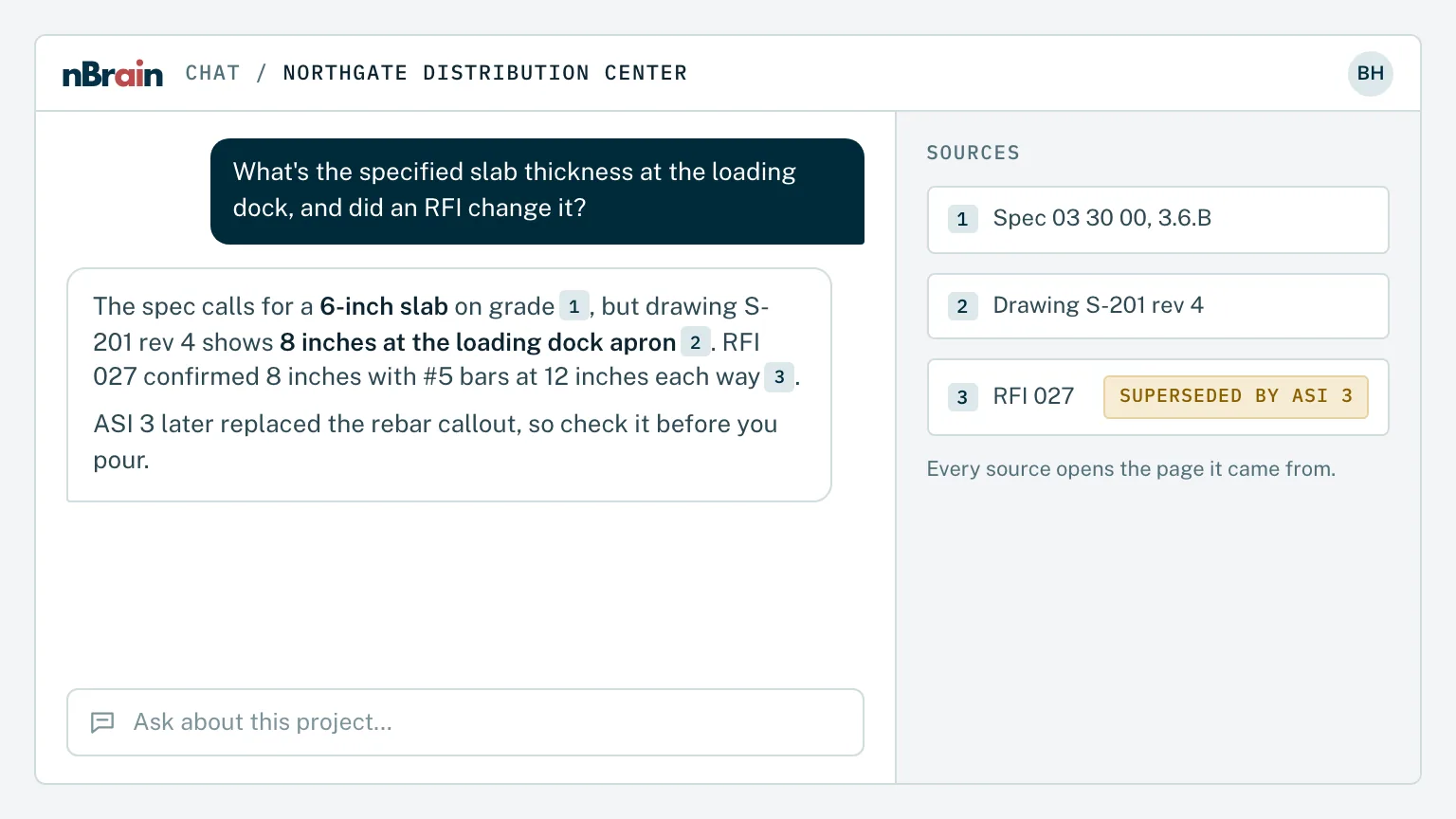
Project managers and superintendents ask in plain English and get answers drawn from specs, drawings, RFIs, submittals, and meeting minutes, with a link to the exact document and section. When a folder holds many versions of one file, the Brain answers from the newest and says which one it used.
Cited to the revisionEvery answer shows the document, revision date, and section, and says so when it can't find support.
Submittal markups readWhen a submittal comes back "Make Corrections Noted," the Brain reads the reviewer's returned file so the PM sees what to correct.
RFI drafts with the history attachedEarlier RFIs and answers on the same detail pulled up first, so the same question isn't asked twice.
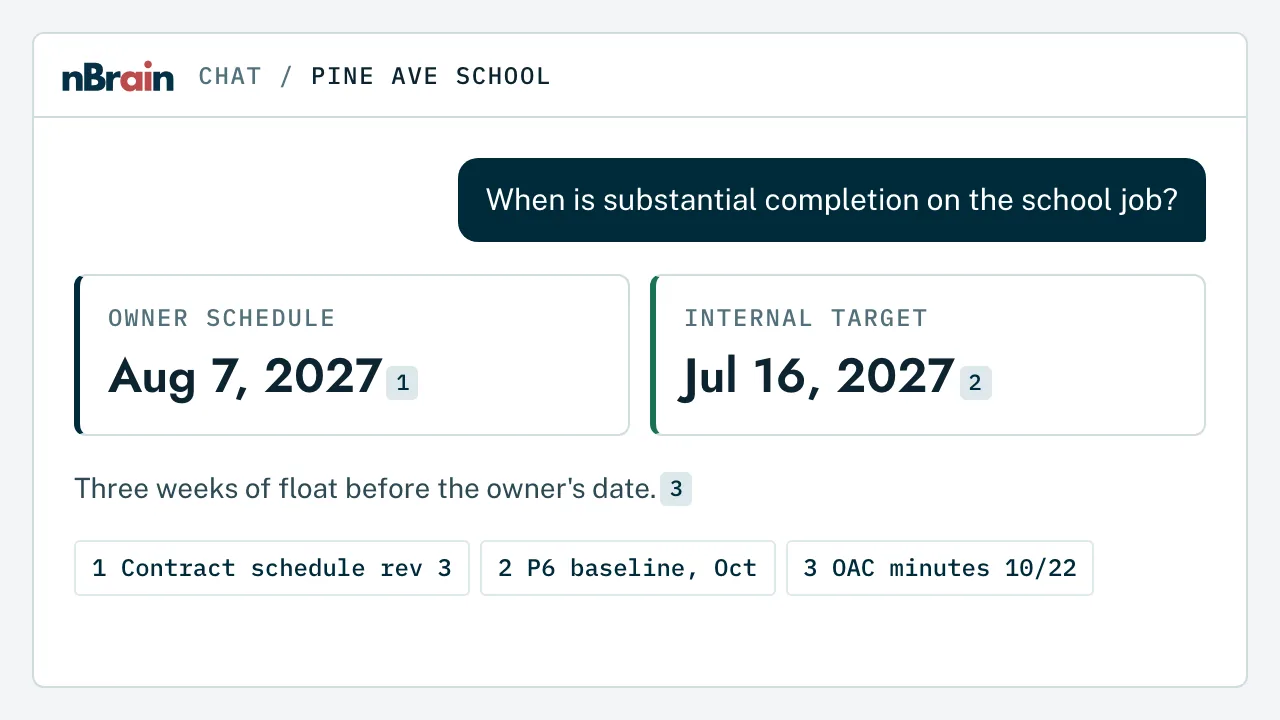
The design team still answers. For one general contractor, a single folder held more than 20 versions of the same schedule. The Brain answers from the newest and gives the owner's contract date with your internal target beside it.
Know which jobs are over budget before the monthly meeting.
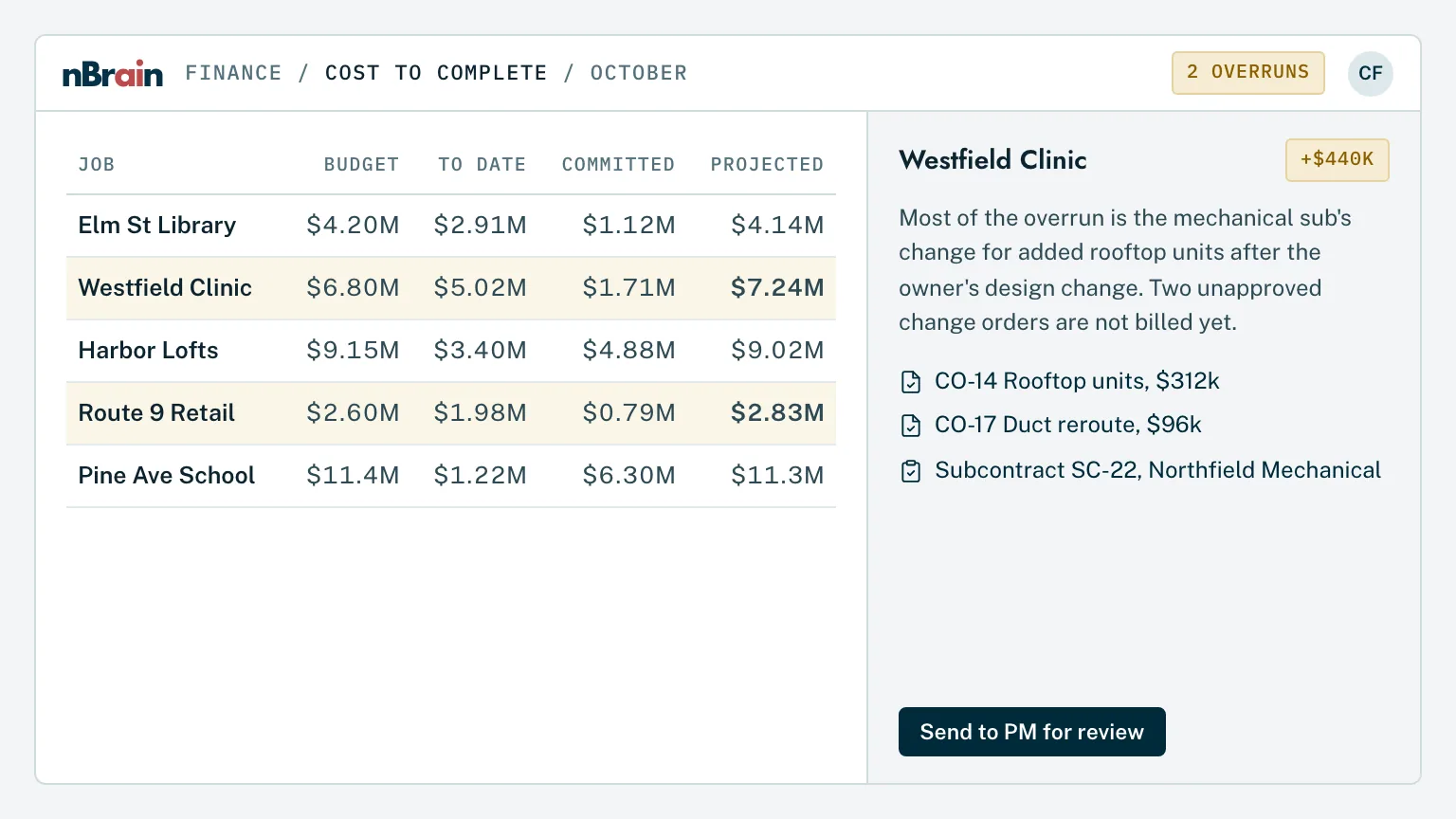
The Brain pulls budgets, committed costs, change orders, and schedules from your project and accounting systems, and answers the questions that take a day of digging today: "Which jobs are over budget this month?", "What's our backlog by project type?", "What's still open on change order 4?"
Change orders tracked to closePending, approved, and billed change orders by job, with the backup documents attached.
Cost-to-complete draftsBudget, cost to date, and committed cost pulled together, with variances explained from the records behind them.
Backlog and WIP viewsBacklog by project type, owner, or PM, ready for the leadership meeting or the bank.
Your PM signs the forecast. The Brain drafts and explains. Forecast numbers, owner billing, and anything sent to an owner or sub wait for the project manager's approval.
Capture the field the way crews already work, on a phone.
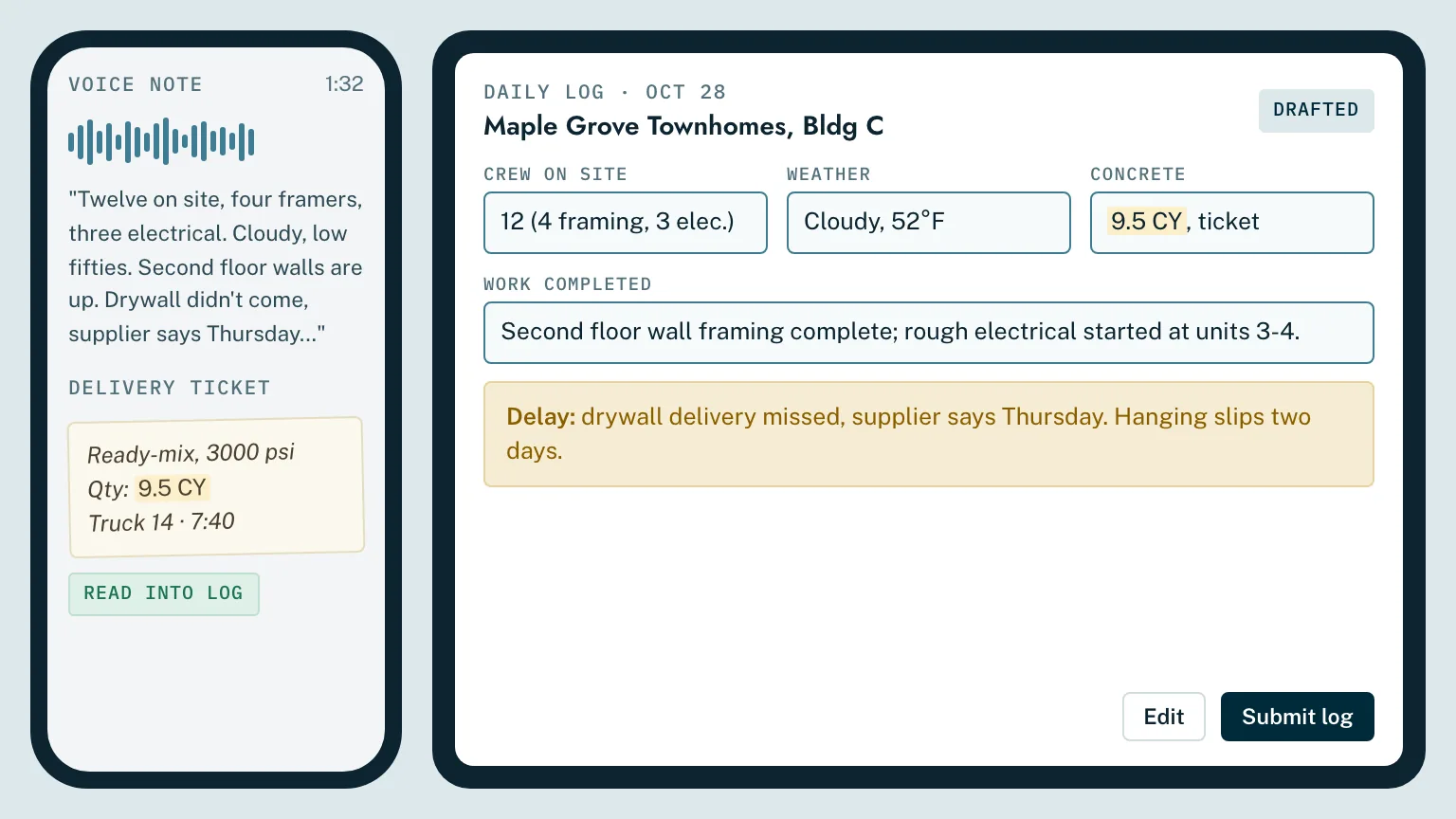
Superintendents and crews talk, text, or snap a photo. The Brain turns it into a daily log or field report, files it to the right job, and reads the handwritten tickets and notebook pages that today never make it into any system.
Voice and photos to a daily logManpower, weather, work completed, deliveries, and delays drafted from a two-minute voice note.
Paper read, not retypedHandwritten covers, field notebooks, delivery and pick tickets read and attached to the job.
On the phone, in the truckThe same Brain on an iPhone or tablet, with dictation and conversation mode for hands-busy work.
Why paper matters. When we read two complete job packets for a drilling contractor, about a third of the files had no machine-readable text at all. The record that matters most is often the one written by hand.
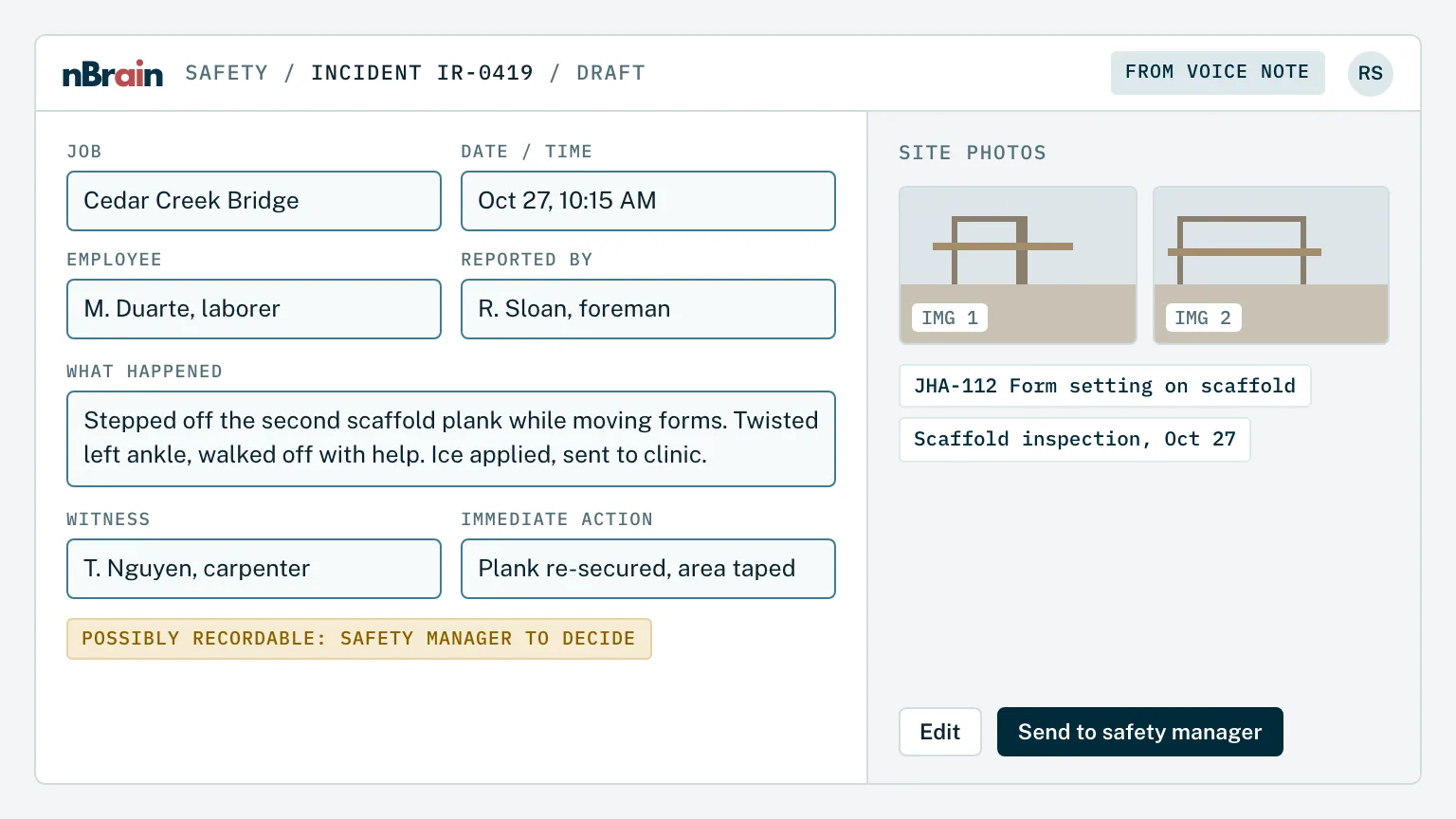
Incident reports started in minutes, OSHA logs kept current.
When something happens on site, the supervisor describes it by voice or text. The Brain drafts the incident report, suggests whether it may be recordable for your safety manager to decide, and keeps the OSHA 300 and 301 records drafts current. It also answers safety questions from your own program, JHAs, and toolbox talks.
Reports drafted from the fieldWho, what, where, and witnesses captured while it's fresh, with photos attached.
Your safety program, searchableSite-specific plans, JHAs, SDS sheets, and procedures answered with the source.
Trends across jobsNear misses and incidents grouped by trade, task, and site, ready for the safety meeting.
Your safety manager decides. The Brain drafts and flags. Recordability, root cause, and anything filed with OSHA or a carrier stay with your safety team.
AI for equipment, maintenance, and troubleshooting
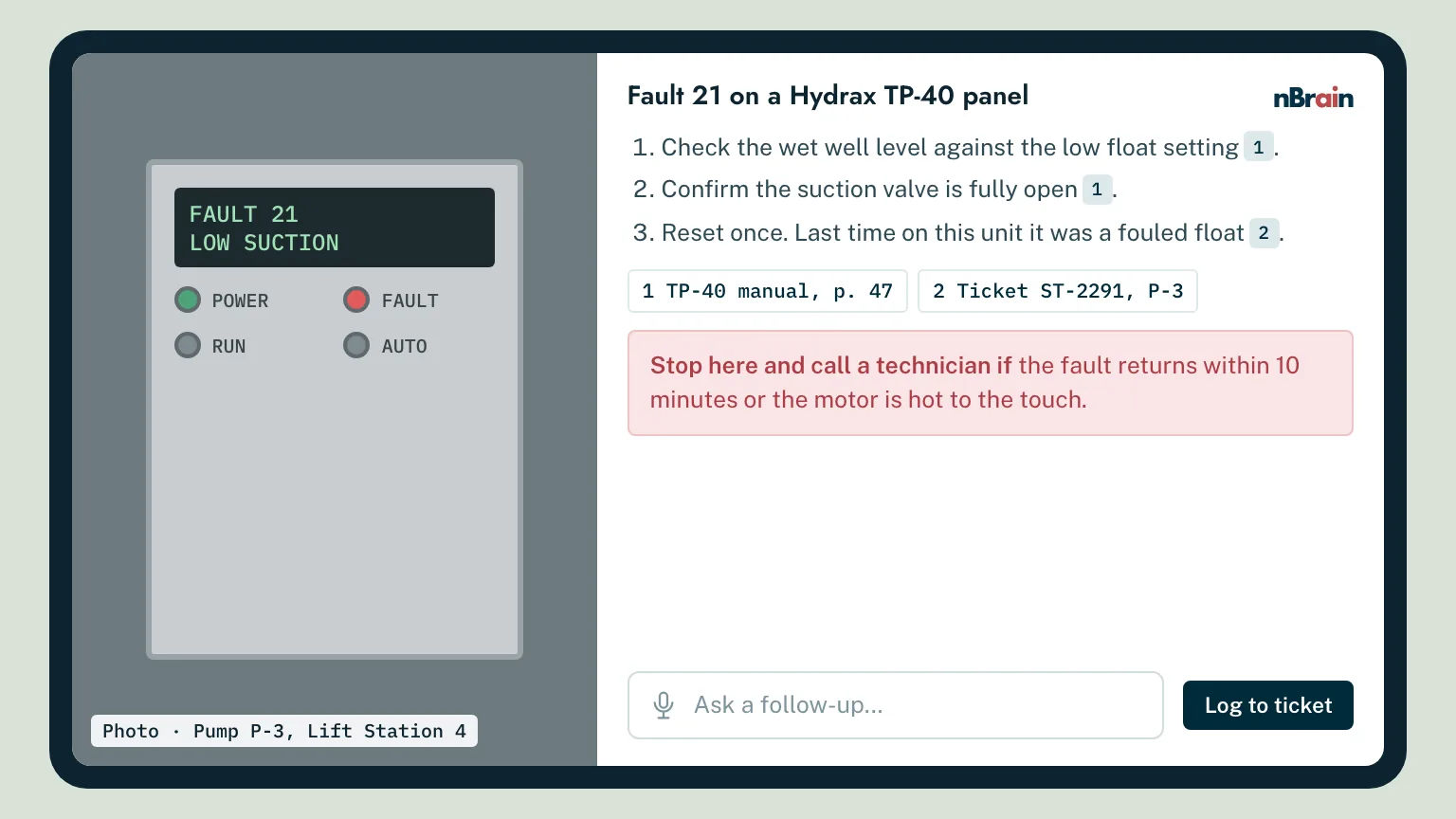
Troubleshoot on site with the manual and your own repair history.
A crew member describes the problem or sends a photo. The Brain answers from manufacturer manuals and your own service history, walks through the safe first checks, and tells them when to stop and call a technician. Maintenance schedules and service records live in the same place.
Manuals plus what fixed it last timeManufacturer documentation combined with your own repair notes for the same unit.
Clear limits on what to touchFirst checks only, with a hand-off to a qualified technician for anything beyond them.
Service intervals trackedHours, intervals, and open work orders by unit, with reminders before something is due.
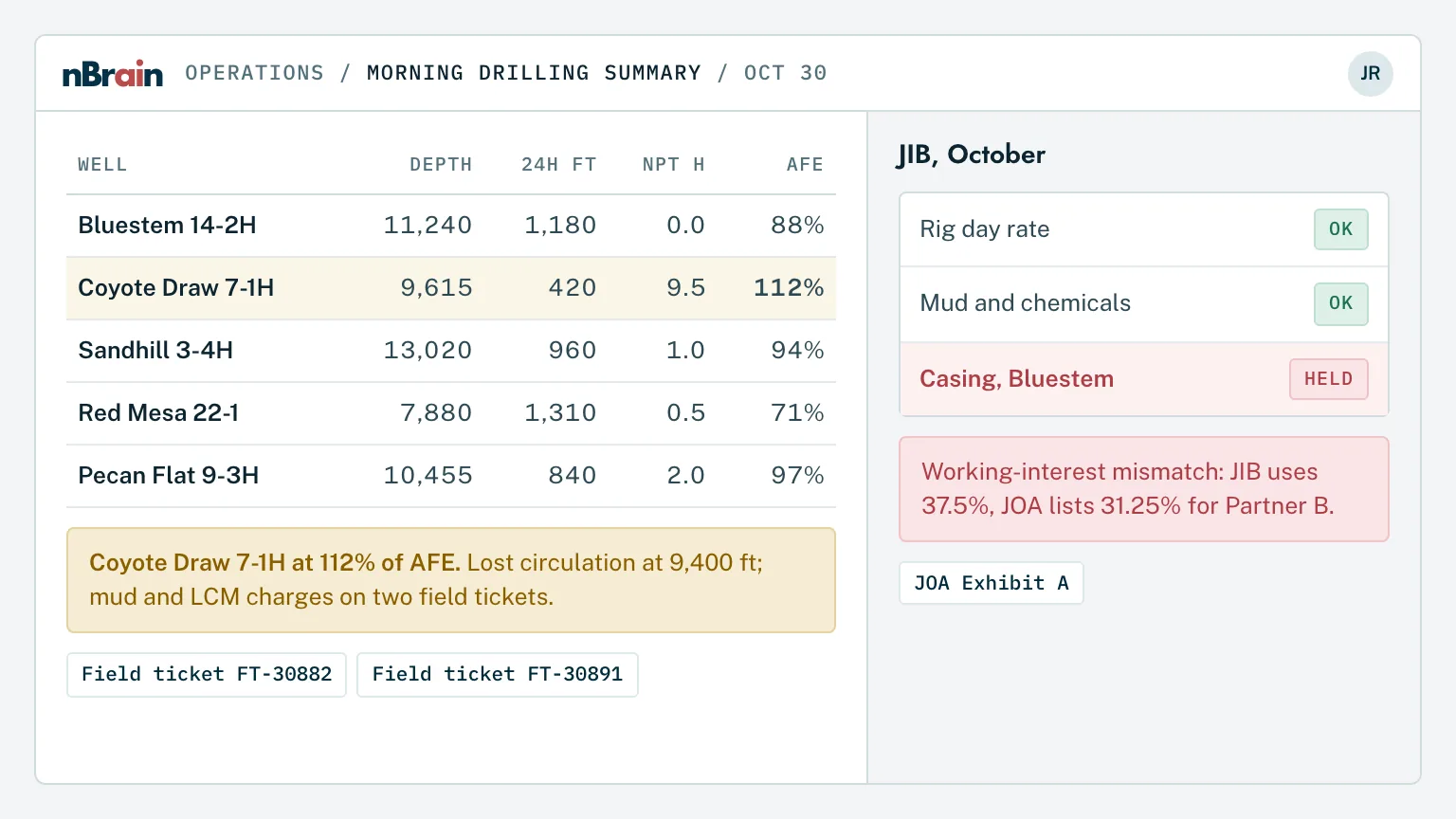
The Brain reads daily drilling and completion reports as they arrive, summarizes what happened on each well, and compares spend against the AFE. On the accounting side, it checks joint interest billing against the operating agreement and flags charges that don't match for your JIB analyst.
DDRs summarized every morningDepth, footage, non-productive time, and issues across every active well in one note.
AFE versus actualSpend by well and category against the approved AFE, with overruns explained from the field tickets.
JIB and cost allocation checkedCharges split by working interest and checked against the operating agreement before statements go out.
Accounting approves. The Brain drafts and flags. Statements, partner billing, and any adjustment wait for your accounting team.
For oil and gas: land, lease, and regulatory filings
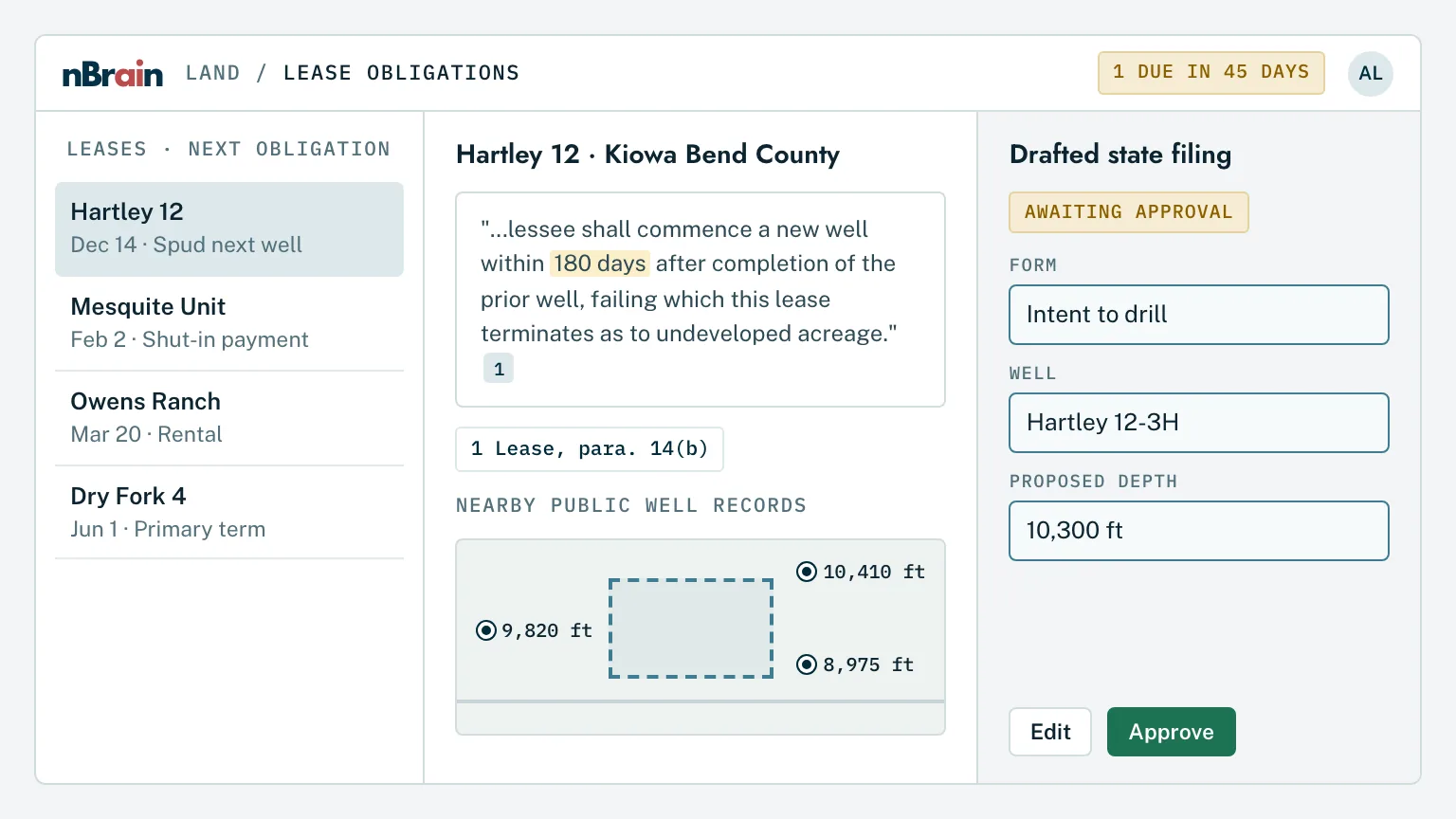
Lease obligations, public well records, and filings in one place.
The Brain reads your leases, division orders, and land files and tracks the dates and obligations in them. It joins your own well records to the public ones, and drafts regulatory filings for a person to review and submit.
Lease terms and deadlinesExpirations, continuous-development clauses, shut-in payments, and consents tracked with the clause cited.
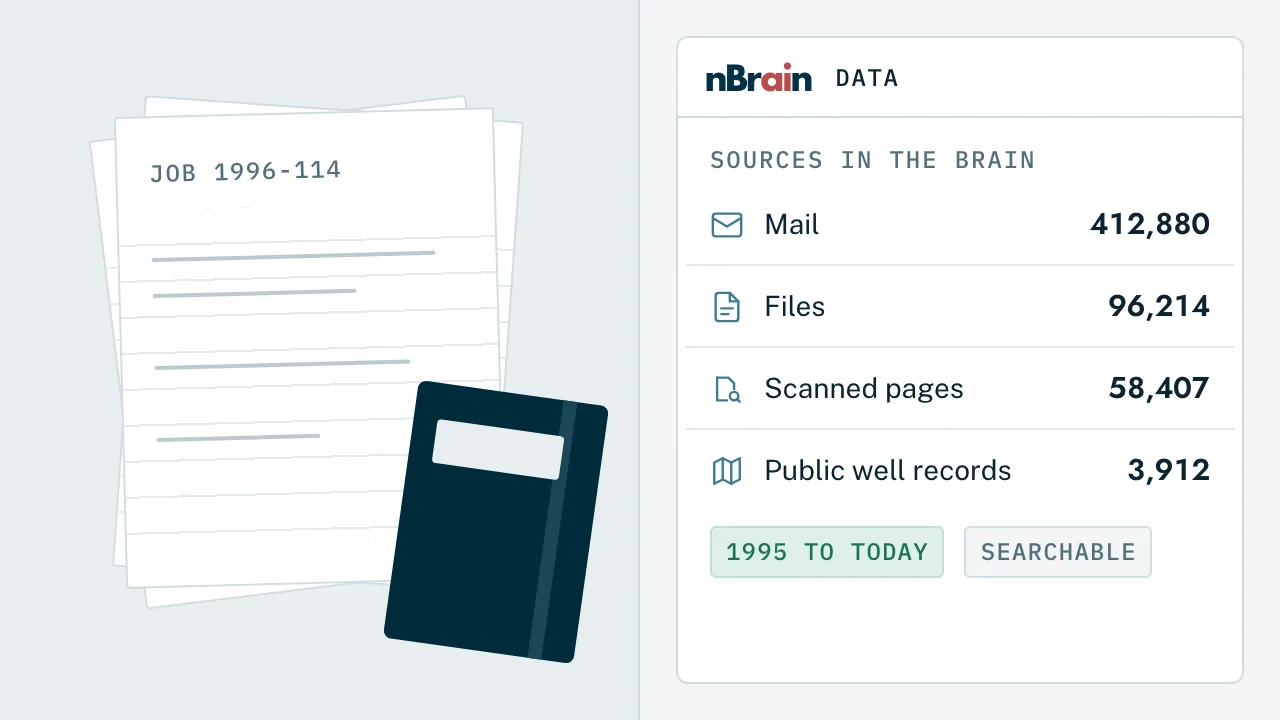
Public well data, joined to yoursFor one drilling contractor, 1.1 million state well records are joined to the company's own job history and refreshed weekly.
Filings drafted, a person submitsPermit and state filings prepared under your own login and held for approval before anything is submitted.
One Brain, built inside your environment, one workflow at a time.
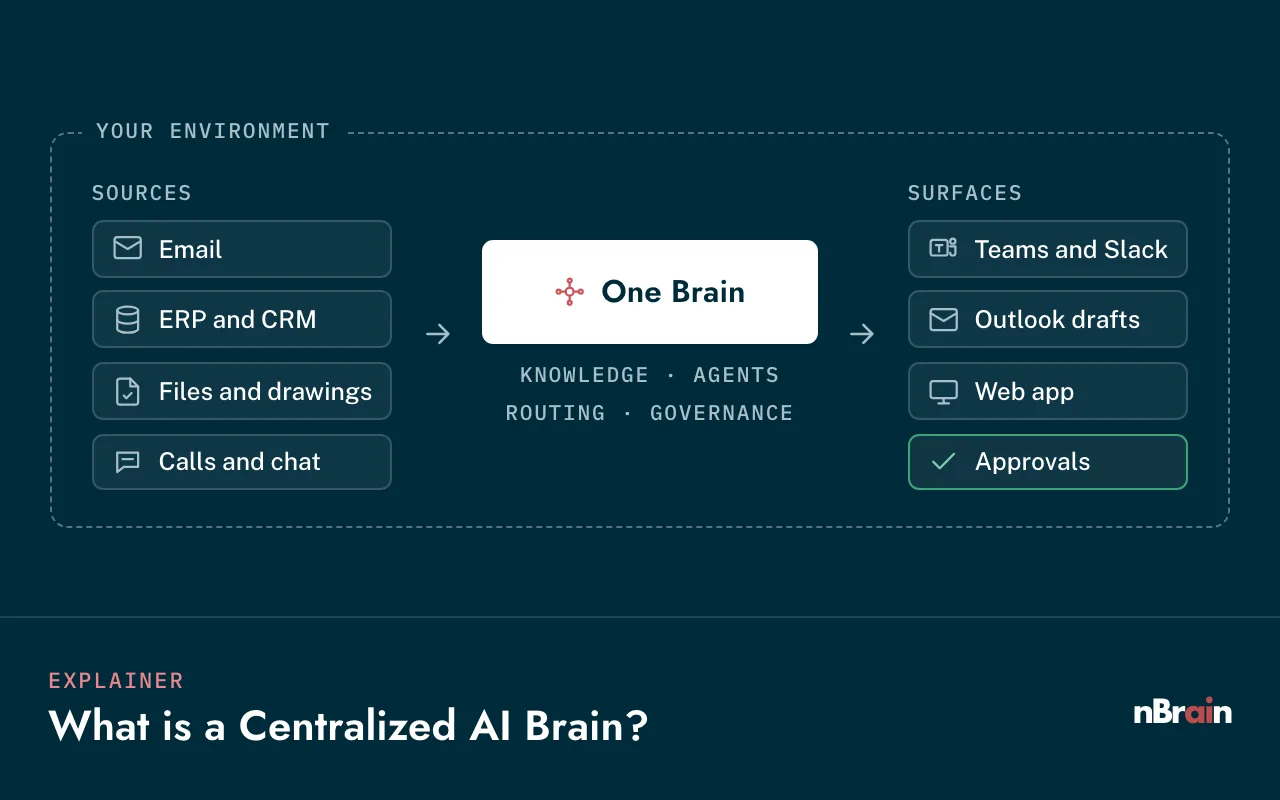
Your systems feed one knowledge layer. The Brain routes each task to the right model and works in the tools your teams already use, under the rules you set.
Step 01
Deploy
Stood up in your Azure or AWS tenant, on your own servers, or on an edge server at a remote site.
Your sign-in, roles, and job access
Encryption in transit and at rest
Edge options for low-connectivity sites
Step 02
Connect
Your project, accounting, document, and field systems, read-only by default.
Project management and bid boards
ERP, job cost, and production accounting
SharePoint, email, and file shares
Step 03
Act, with approval
Agents search, draft, check, and route. A person approves anything that goes to an owner, a sub, a partner, or the state.
Approval queues by role
Citations on every answer
Low-confidence answers flagged
Step 04
Measure and expand
We take a baseline in month one, then add the next workflow on the same data and permissions.
Connected through their APIs, direct read-only database access, or scheduled exports. In client work today, the Brain reads Procore, BuildingConnected, SharePoint, and Microsoft 365 mail, calendars, and Teams meeting transcripts. Anything without a connector is built as part of the engagement.
Match the deployment to the site.
Option 01 · Your cloud
Your Azure or AWS tenant
The Brain runs in a cloud account you own, under your sign-in, your keys, and your bill. Most contractors and operators start here.
Models
GPT-6 Astra, Claude Opus 5.5, or Gemini 4 Argon through endpoints you approve, plus open-weight models in your tenant.
Best for
Office teams, estimating, project controls, and accounting.
Option 02 · On-premises
Your data center or server room
Installed on servers and GPUs you own, behind your firewall, for companies that want the data on their own hardware.
Models
Open-weight models on your GPUs. Hosted models only if you allow a connection.
Best for
Sensitive land, lease, and financial records, and companies with their own IT.
Option 03 · Edge at the site
A small server at the yard, rig, or trailer
For remote sites with weak or no signal. Crews keep asking questions and logging work locally, and records sync back to the main Brain when the connection returns.
Models
Open-weight models such as Llama, Mistral, or Qwen, running on the edge hardware.
Best for
Drilling locations, pipeline and remote job sites, and satellite-only connections.
The trade-off, stated plainly
GPT-6 Astra, Claude Opus 5.5, and Gemini 4 Argon are hosted services, so they need a connection. At an edge site with no signal, the Brain uses open-weight models on local hardware. Those handle search, cited answers, summaries, and first drafts well, and can trail the hosted models on the hardest multi-step reasoning. We test them on your own documents before go-live and show you where the difference matters.
Your data. Your rules. A person approves what matters.
Owners, subs, partners, and lenders trust you with their numbers. These controls are built in from the first week, so the Brain never becomes the leak.
Runs inside your environment
Your cloud tenant, your servers, or an edge box at the site. No nBrain-hosted copy of your data, and your data never trains public models.
Job-level permissions
Access mirrors your sign-in and each source system, so people see the jobs, bids, and folders they can already open, checked on every request.
Approval gates
Anything sent to an owner, sub, partner, or agency, any accounting write, and any record change waits for the right person to approve it.
A full audit trail
Which data, which model, which person, and which action, recorded every time and kept in your environment.
Personal data held back
Files and mail carrying Social Security or bank account numbers, and HR records, are kept out of search unless you decide otherwise.
Your cloud, on-prem, or edgeAzure and AWS tenantsRole and job-level accessApproval gatesFull audit trailData never trains public models
What we do and don't claim. nBrain doesn't claim certifications on your behalf. The Brain deploys inside an environment you control and is designed to support your safety, records, and audit programs. Your safety, accounting, and land teams keep the final say on anything filed or sent.
Agents we build into a construction or energy Brain.
Each agent has one job, a defined set of tools, and guardrails on what it can do. They share the same data, permissions, and audit trail, so each new one ships faster than the last.
Preconstruction
Bid finder
Finds past and open bids by owner, type, year, or scope, with results.
Estimating
Estimate line checker
Compares a draft estimate with similar past jobs and flags missing lines.
Documents
Spec and drawing Q&A
Cited answers from the current revision of specs, drawings, and RFIs.
Submittals
Submittal reviewer
Reads returned submittals and markups and lists what to correct.
Project controls
Change order tracker
Follows each change order from request to approval to billing.
Project controls
Cost-to-complete reporter
Drafts monthly forecasts and WIP views with the variances explained.
Field
Daily log builder
Turns voice notes, texts, and photos into a filed daily log.
Safety
Incident report drafter
Starts the report from the field and keeps OSHA log drafts current.
Equipment
Field troubleshooter
First checks from the manual and your repair history, then a hand-off.
Drilling
DDR and AFE monitor
Summarizes drilling reports and flags wells running over AFE.
Accounting
JIB and invoice checker
Checks partner billing and vendor invoices before anything is paid or sent.
Land & regulatory
Lease and filing tracker
Tracks lease obligations and drafts filings for a person to submit.
These Brains are running for contractors today, on their own records, in their own accounts.
A regional commercial general contractor
Every project folder, bid, and meeting answerable from one place.
Leadership asked simple questions that took hours of digging across six systems. The Brain now runs in the contractor's own Azure tenant and answers across them.
Procore, the bid board, SharePoint, email, calendars, and Teams meeting transcripts connected
Answers come from the newest version of a file and cite it
Tested against a leadership question set before launch, with writes to outside systems switched off
55,000+
project files indexed and searchable, in about 21 hours
A family-owned drilling contractor
The owner's knowledge, written into a record the company keeps.
The owner wanted a company that runs on its own record, not on his memory. Two decades of mail, job folders, and handwritten paper now sit in one Brain in the company's own cloud account.
4,000+ scanned pages and photos read without sending them to an outside service
1.1 million state well records joined to the company's own jobs
Estimating with missing-line checks is next, on the same record
22,930
historical emails searchable in the first week of the data load
4,480
archive files from 2005 on, with employee and bank records held back
Results are anonymized and come from nBrain clients. Client names are withheld.
Straight answers
The questions contractors and operators ask us first.
Does it work at remote sites with weak or no connectivity?
Yes. The office Brain runs in your cloud or on your servers, and crews reach it from a phone or tablet over whatever connection the site has, including satellite. For sites with no reliable signal, an edge server at the yard, rig, or trailer runs open-weight models locally and syncs records back when the connection returns. Hosted models like GPT-6 Astra and Claude Opus 5.5 need a connection, so we test the local models on your own documents first and show you where the difference matters.
Which systems can it connect to?
Project management and bid platforms such as Procore, Autodesk Build, and BuildingConnected; ERP and accounting systems such as Viewpoint Vista, Sage, CMiC, Acumatica, and QuickBooks; oil and gas systems such as Quorum and WellView; and SharePoint, file shares, email, and calendars. These are examples, not a fixed list. We connect through APIs, direct read-only database access, or scheduled exports, and build any connector you need as part of the engagement.
Does our data go to OpenAI or Anthropic?
Not to train their models, ever. You decide which models may see which data. Hosted models are called through accounts in your name or endpoints in your own cloud, and anything you want kept on your own hardware runs on open-weight models in your environment. Every call is logged.
Can field crews use it from a phone?
Yes. The same Brain works on a phone or tablet, with dictation, photos, and a conversation mode for hands-busy work. Crews can also send texts, photos, or voice notes that land on the right job. They see only the jobs and records their role allows.
Can it read handwritten tickets, scanned plans, and old paper files?
Yes. Scanned pages, photos, and handwriting are read and attached to the job, and low-confidence reads go to a review queue for a person to check. Where you prefer, scanned pages can be read on hardware you control so nothing goes to an outside service.
How do you keep owner, sub, and partner data separate?
Access mirrors your sign-in and the permissions in each source system, checked on every request. People see the jobs, bids, and folders they can already open there. Anything sent to an owner, a sub, a partner, or an agency waits for a person to approve it, and every step is logged.
Will it replace our estimators or project managers?
No. It does the searching, matching, and first drafts that eat their week. Estimators still set the price, PMs still sign the forecast, safety managers still decide what's recordable, and accounting still approves partner billing.
What happens when the AI gets something wrong?
It will sometimes be wrong, so it's built for that. Answers show their sources, low-confidence answers are flagged, and anything that leaves the building waits for a person to approve it. Every step is logged, so you can see what happened and why.
What does it cost, and how long does it take?
Builds start at $40,000, and a typical build takes about three months. Running costs, meaning your own cloud and model accounts, are billed to you directly at list price with no markup. Model routing sends each task to the right model, which runs about 65% lower model cost than sending everything to one top model.
Who owns it?
You do. The platform, the data, the prompts, the agents, and the code we build for you are yours, in accounts in your name. We operate and improve it for you, and you can take it fully in-house at any time.
Where should a contractor or operator start?
With one high-volume workflow where people spend time searching and retyping, such as project document questions, estimate checks, daily logs, or drilling report summaries. We take a baseline in month one and measure hours returned, then add the next workflow on the same foundation.
Should we build this in-house instead?
Your team can build a chatbot. Most of the time goes into what sits around it: permission-aware search, connectors to your project and accounting systems, model routing, evaluation, approval gates, audit logs, and keeping all of it current as models change. We bring that layer already built. Your IT team stays involved, owns the code and data, and can take it over at any time.
More resources
Go deeper on private AI for contractors and operators.
Put private AI to work on your jobs, your wells, and your records.
In one strategy session we map where a Brain would give your estimators, PMs, field crews, and accounting team the most time back, which systems to connect first, and which deployment fits your sites, from your cloud to the edge.