We're a professional services firm too. We run the whole company on our own Brain. This page is the case study.
nBrain sells expertise by the engagement, the same way you do. Sales, proposals, delivery, finance, contracts, and reporting at nBrain all run on the same platform we build for clients. Below is what that looks like from the inside, then what it would look like inside your firm.
Our own firm runs on it dailyClient-by-client permissionsA person approves anything a client sees
Behind the scenes
How nBrain runs on its own Brain
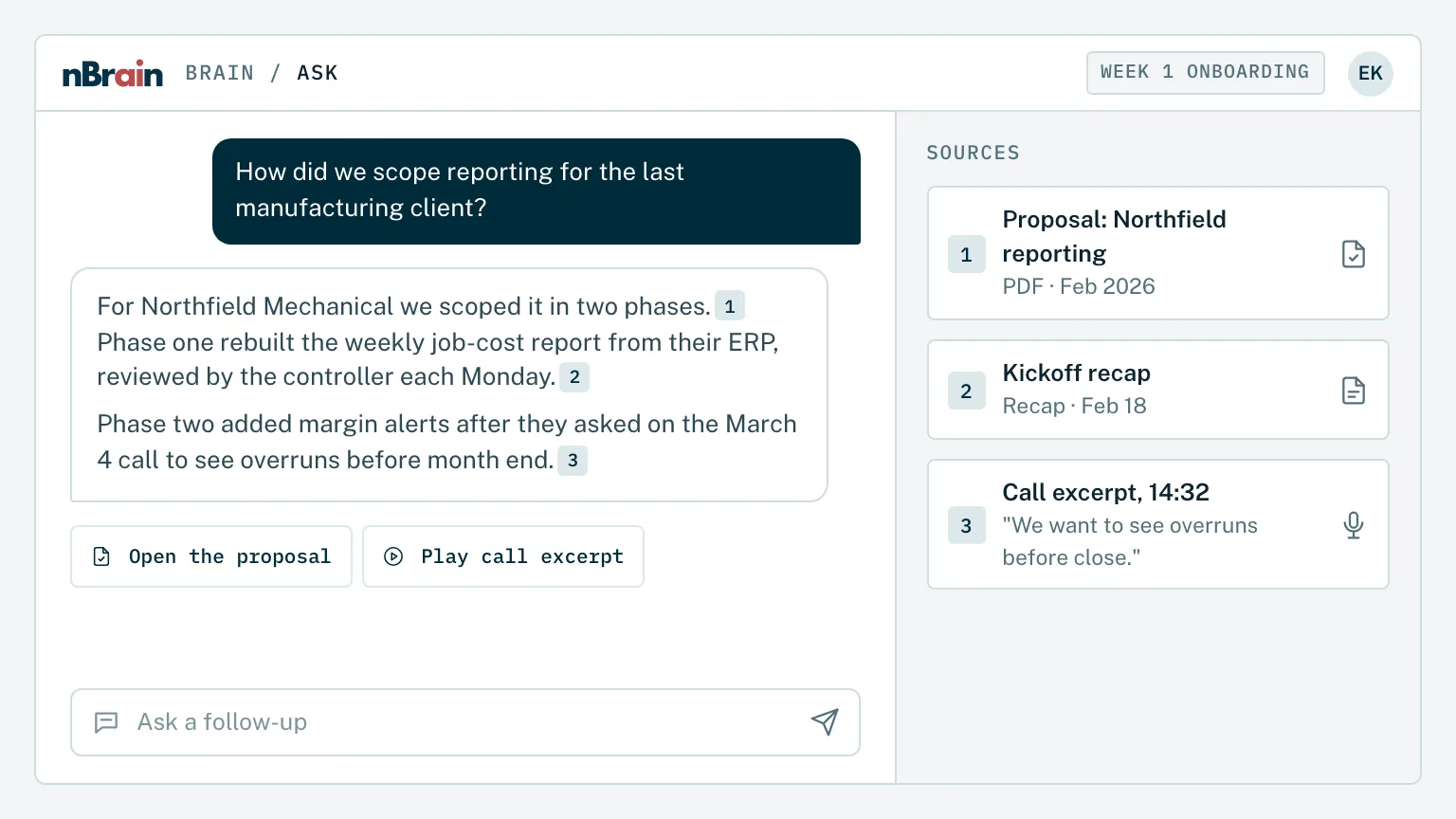
Proposals, call transcripts, email, and the CRM, in one place.
We are you
Same business model. Same bottlenecks. We just fixed ours first.
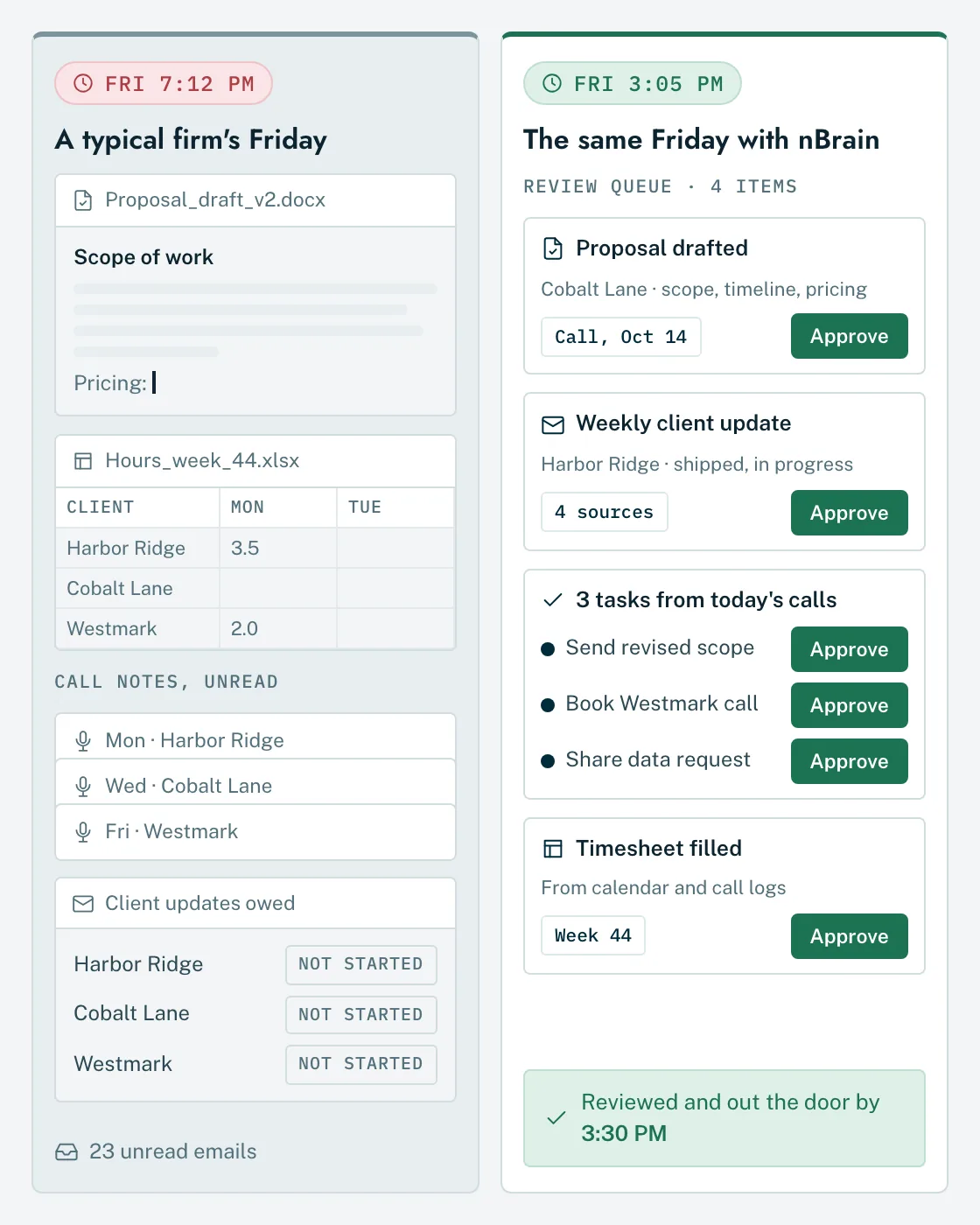
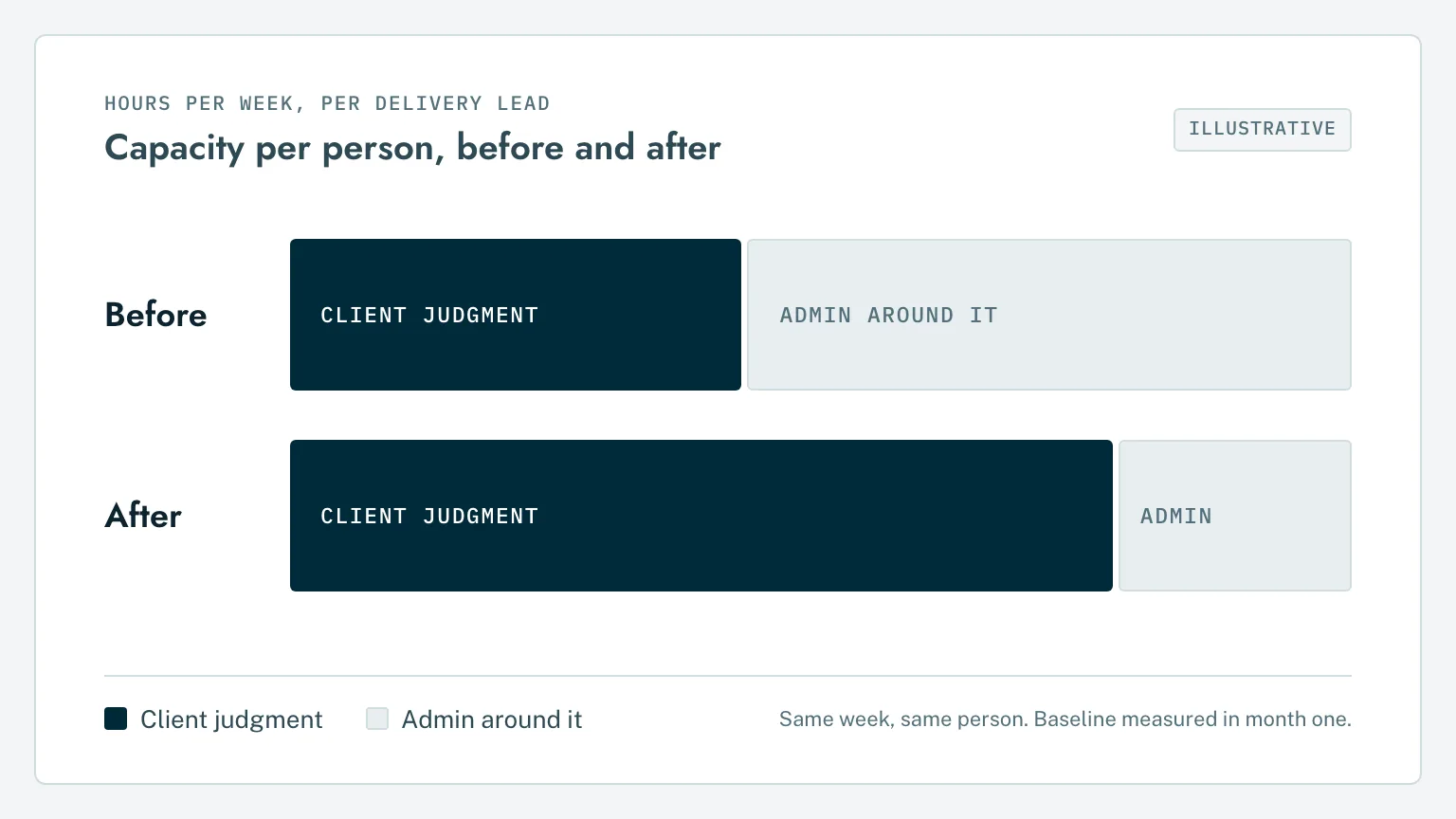
A services firm sells the judgment of its people. Most of their week goes to everything around that judgment: notes, drafts, updates, status, and data entry. That's the work we moved onto the Brain.
Your firm
Partners spend evenings writing proposals.
nBrain
Proposals are drafted from the call transcripts and reviewed the same day.
Your firm
Client updates eat Friday afternoon.
nBrain
Weekly updates are written from the work itself and sent after a read-through.
Your firm
Promises made on calls live in someone's notebook.
nBrain
Commitments are pulled from meetings and email and land as tasks with a due date.
Your firm
The best answer to a client question left with the last senior hire.
nBrain
Every past engagement is searchable, with the source attached.
We run on it
We run our own company on a Brain. Watch it work.
Sales, proposals, delivery, finance, contracts, and reporting at nBrain all run on the same platform we build for clients.
A custom proposal from two discovery calls
The agent reads the prospect's CRM record, the call transcripts, and our brand guide, then writes every page. A person reviews it before it goes out.
The 30-second tour
Twelve departments, one platform.
Demo: a full Brain for a property firm
Finance, leasing, and operations on one platform.
A week inside nBrain
Nine workflows we moved onto our own Brain.
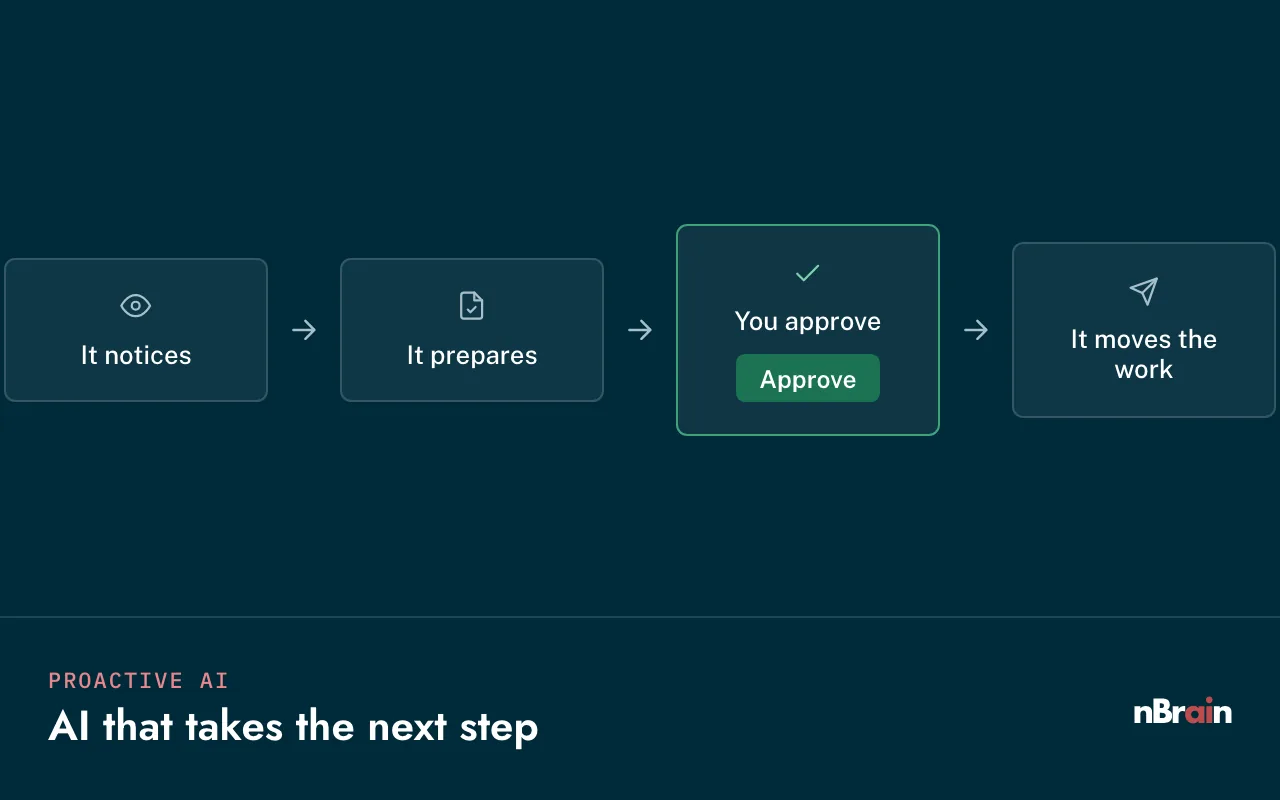
Each one is work every services firm does. The Brain prepares it, a person approves it, and the time comes back to client work.
Discovery calls
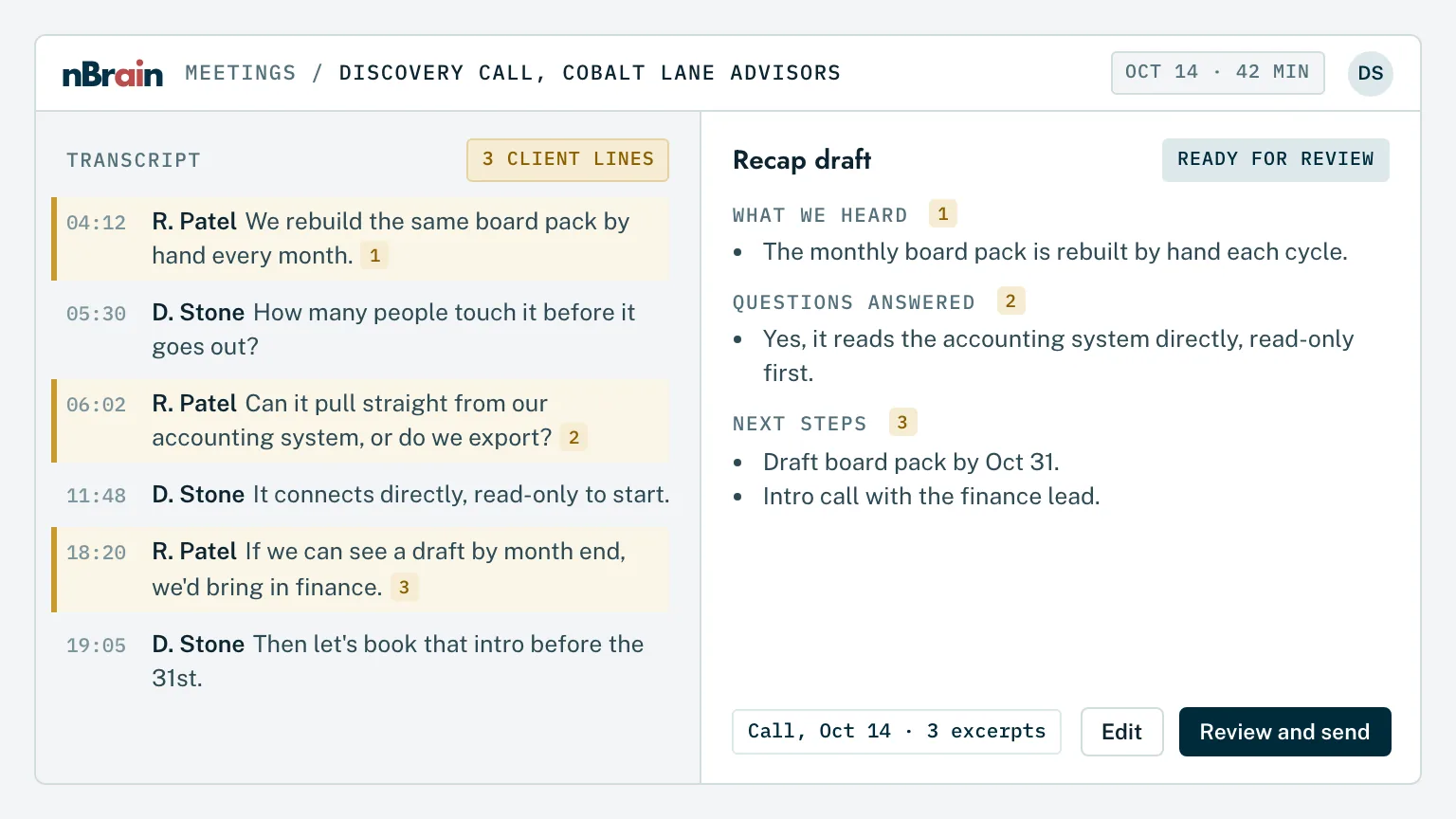
The call ends. The recap is already drafted.
Every client and prospect call is transcribed. The Brain reads it next to the CRM record and prior emails, then drafts a recap in our format: what we heard, what they asked, what we committed to, and the next date.
Their words, keptThe client's own pain points are quoted back, with the timestamp in the transcript.
A recap becomes a proposalThe same record feeds the proposal, so nothing is retyped.
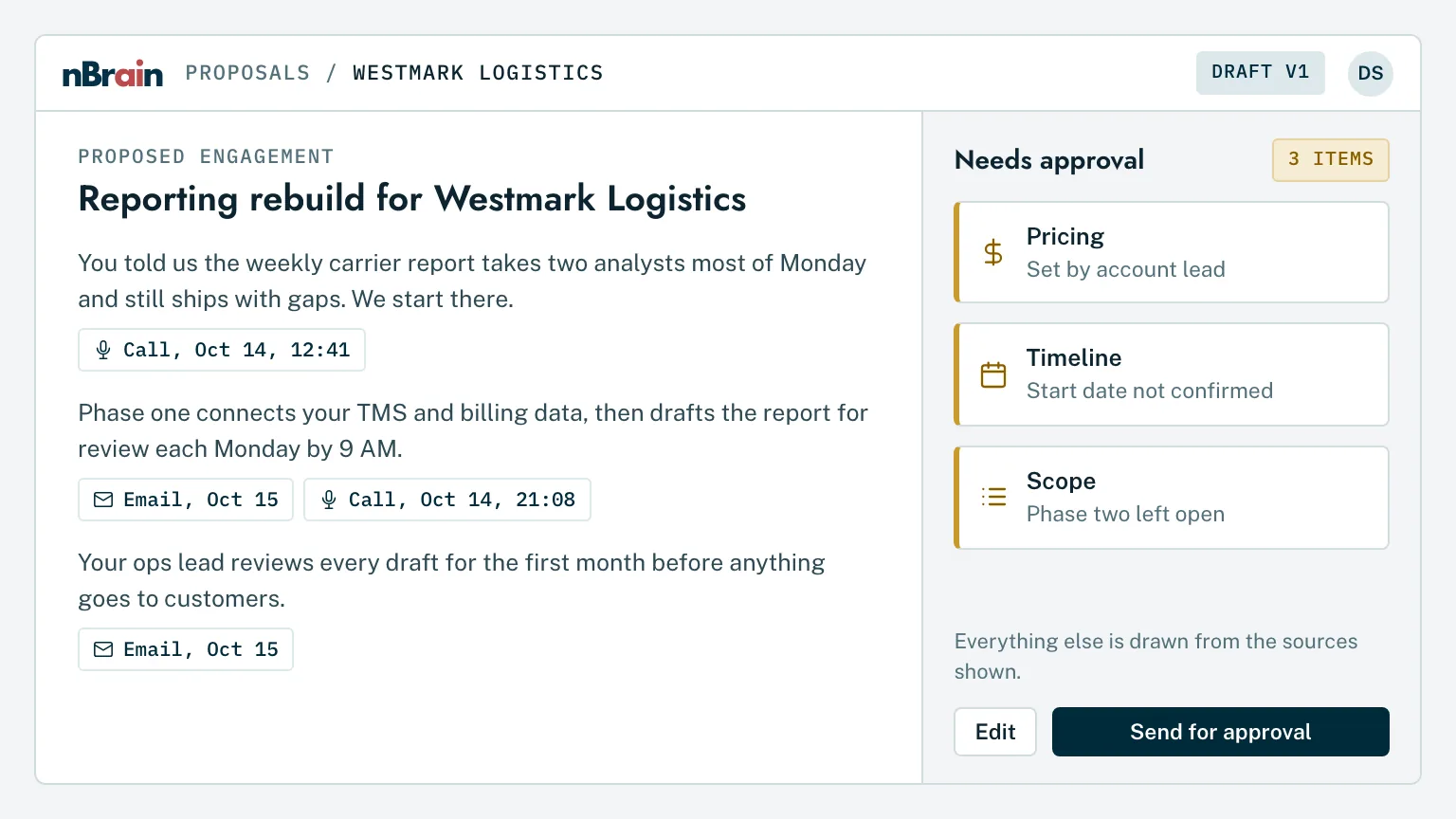
Proposals and statements of work, drafted from what the client actually said.
One sentence starts it: "create a proposal for this prospect." The Brain pulls the calls and emails, our pricing rules, and our brand system, writes every section, and flags anything it can't support. Scope, price, and terms are approved by a founder before anything is sent.
No blank pageEvery draft starts from the client's own transcript and the closest past engagement.
SOWs that match the proposalDeliverables, acceptance, and change control carried straight into the statement of work.
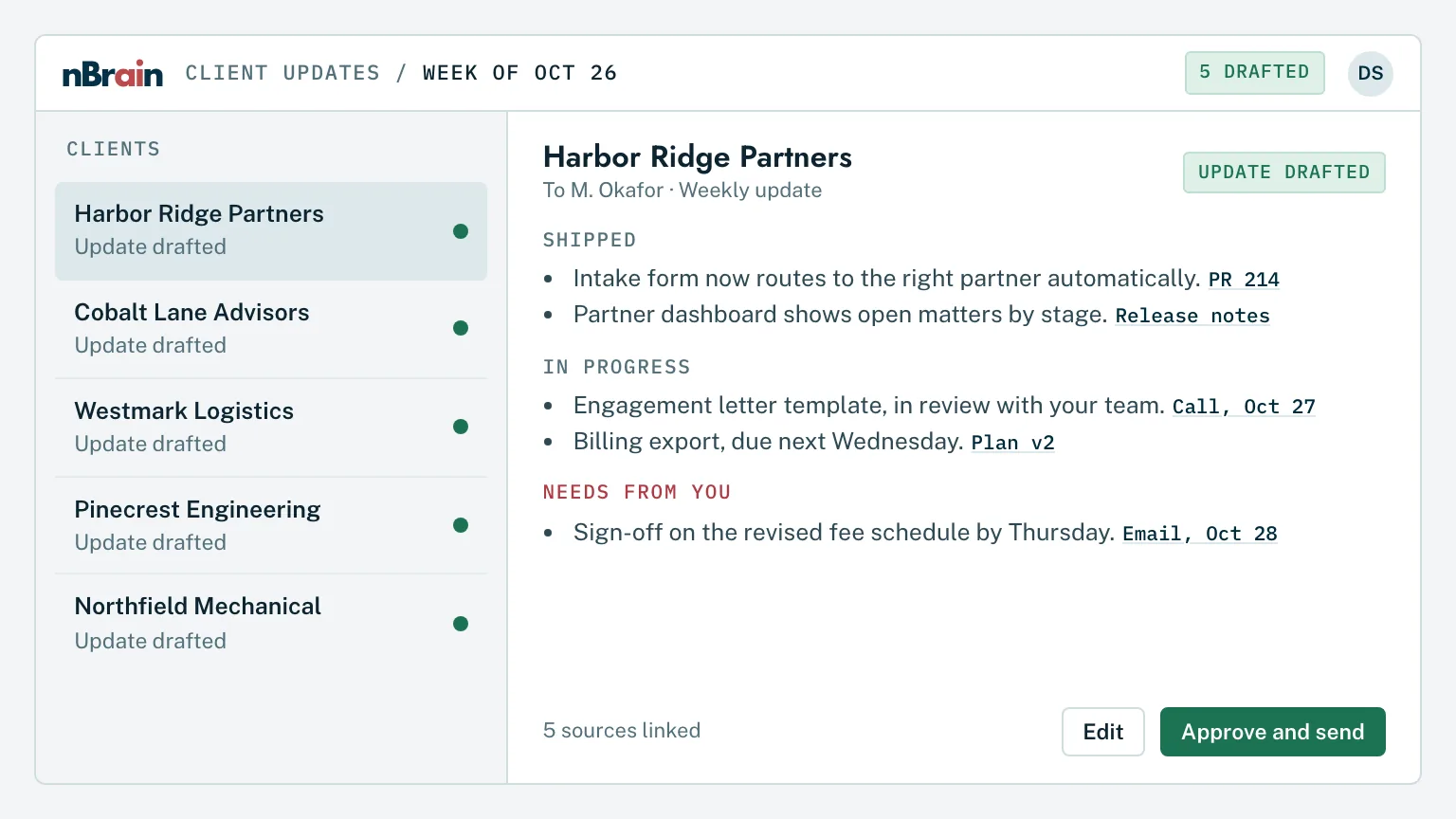
Weekly client updates, written from the work itself.
The Brain reads what actually happened that week across code, tickets, email, and meetings, then writes each client's update in plain language. The account lead reads it, edits if needed, and sends it.
Built from evidenceEach line traces back to a commit, a ticket, or a meeting.
Reviewed, never auto-sentThe account lead edits and sends. Nothing reaches a client without a person reading it first.
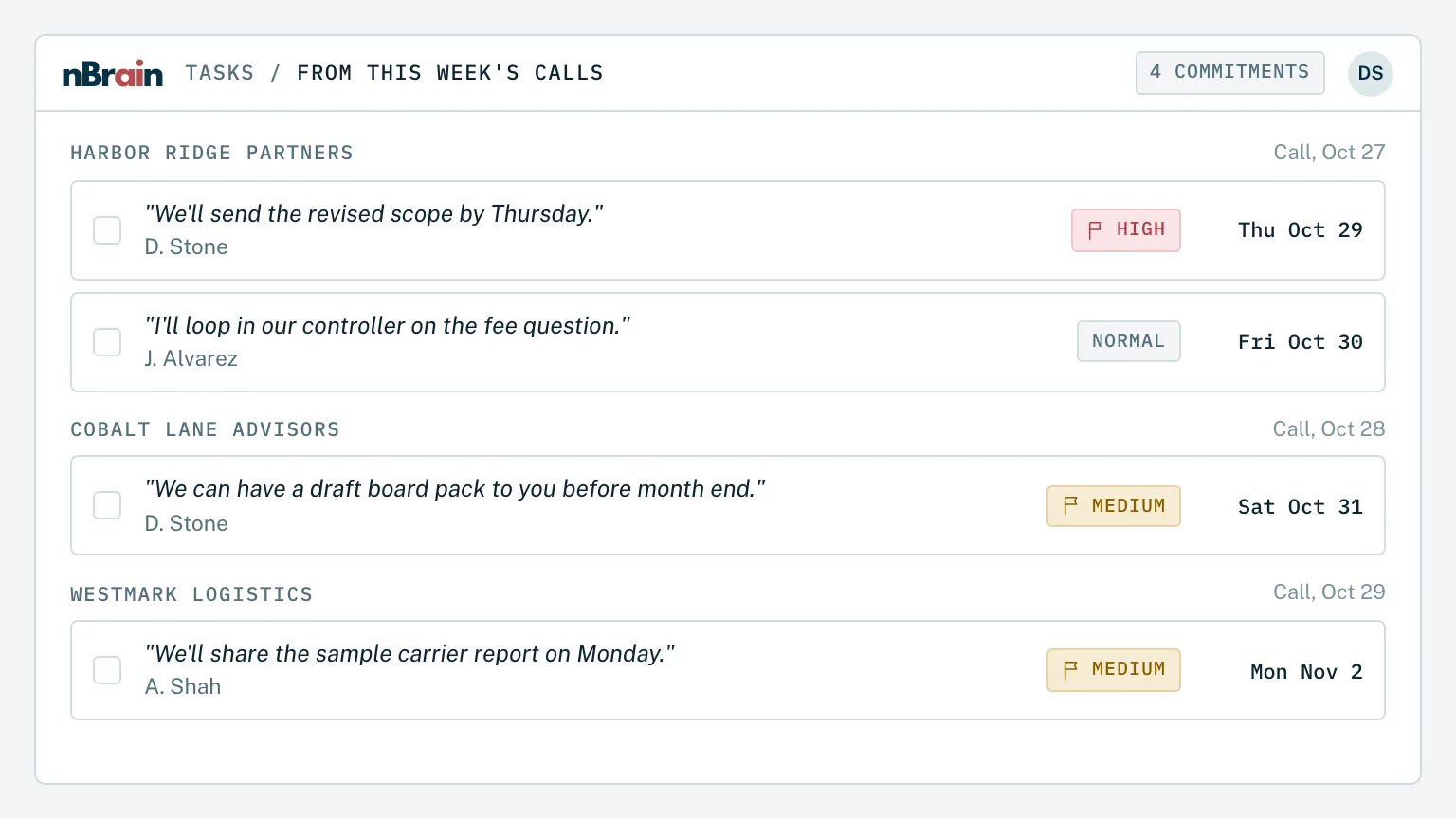
Every promise made on a call becomes a task with a due date.
The Brain reads meeting transcripts and client email for anything someone at nBrain committed to, then files it as a task for that person with the exact excerpt attached, so the reason and the deadline travel with it.
The quote comes with itWho said it, on which call, in their words.
A person confirmsTasks the Brain isn't sure about are flagged for review instead of filed silently.
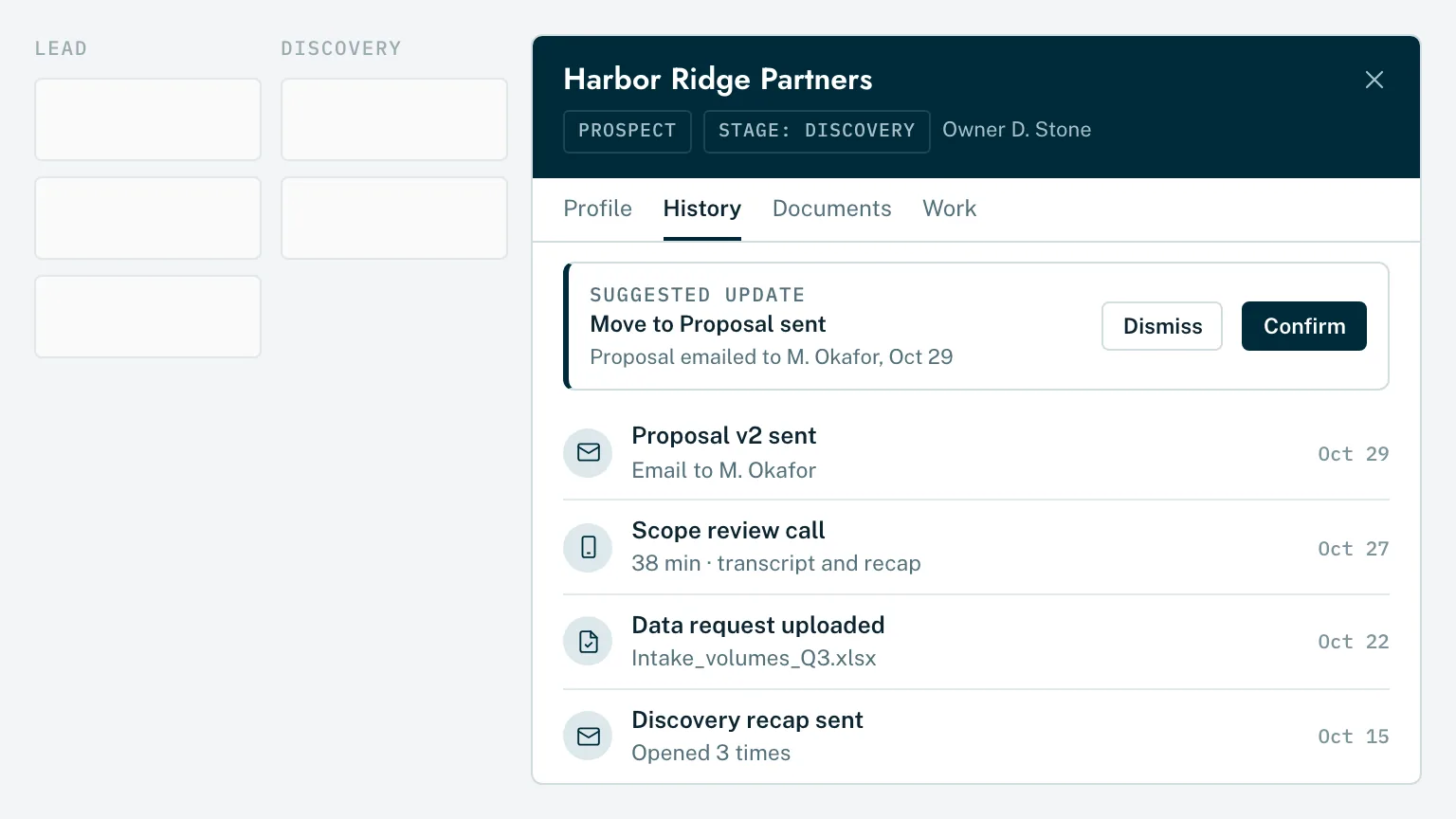
A CRM that stays current without anyone typing into it.
Emails, calls, meetings, documents, and proposals land on the right company record on their own. Stage changes and next steps are proposed by the Brain and confirmed by the owner.
One record per clientEvery conversation and document in one place, searchable in plain English.
Pipeline you can trustStages reflect what was actually said, not what someone remembered to update.
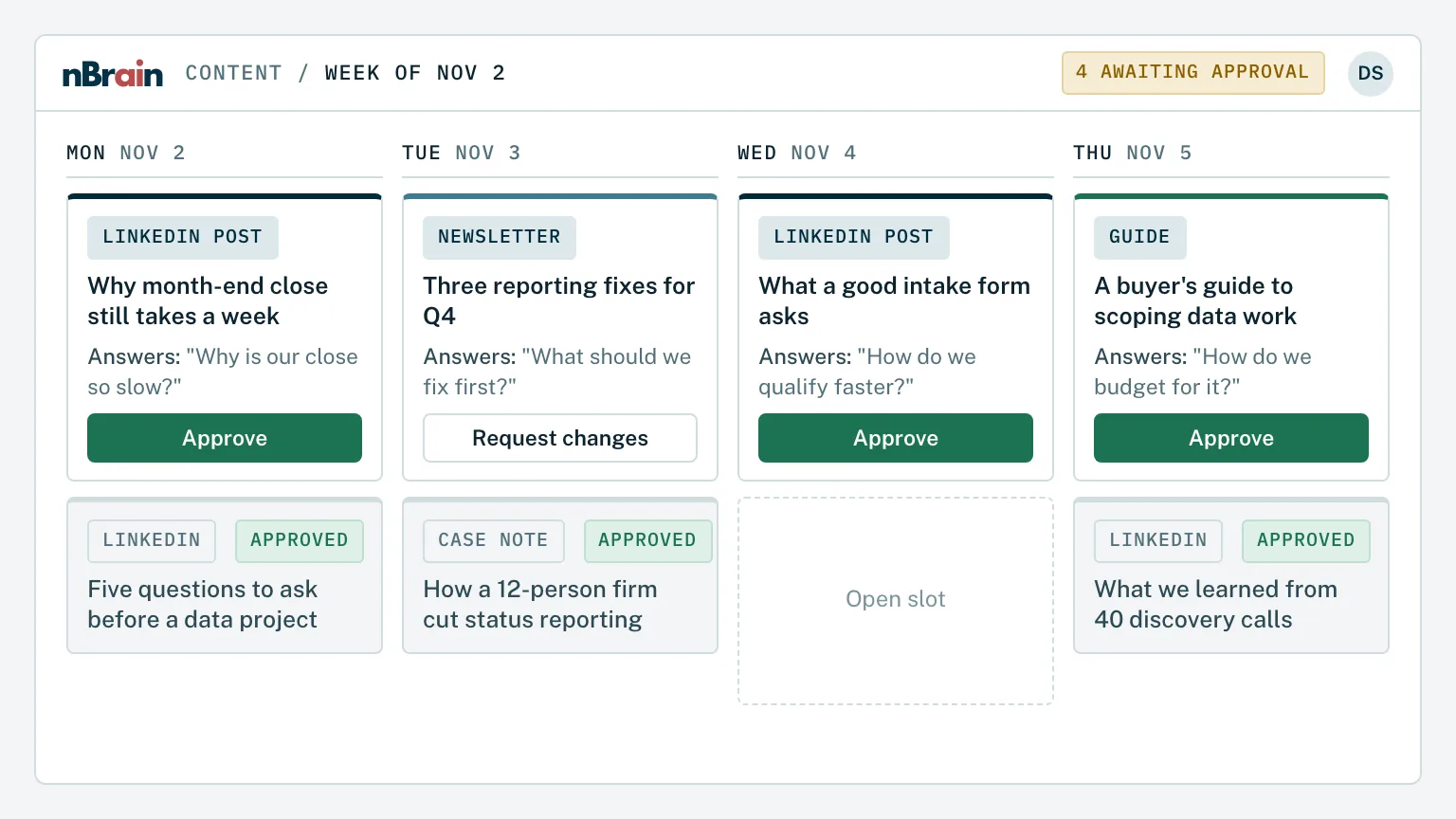
Content and campaigns built from what clients actually ask.
The Brain mines our calls and emails for the questions prospects ask most, then drafts posts, guides, newsletters, and outbound campaigns in our voice. A person approves every piece before it's published or sent.
On brand by defaultThe Brain writes against our brand guide and flags anything off-voice.
Approval before publishingEvery post, guide, and campaign waits in a queue until a person approves it.
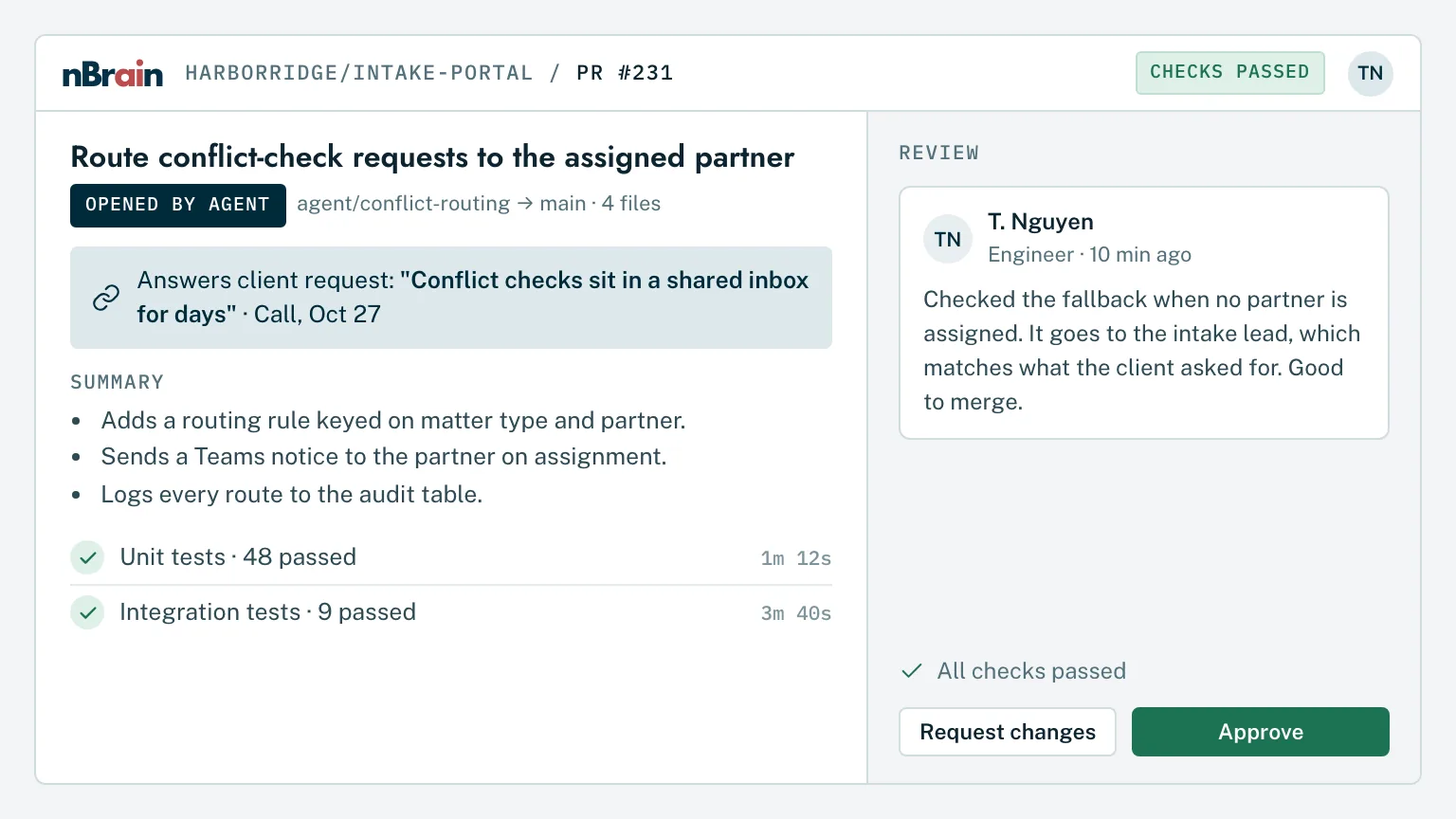
Client code built and shipped with AI agents, reviewed by engineers.
Our engineers work alongside coding agents that read the client's repository, the scope, and the meeting history. Agents draft the change, run the tests, and open the pull request. An engineer reviews and merges.
Code in the client's repositoryThe client owns the code from the first commit.
Every change reviewedNothing merges without an engineer's approval.
New hires learn from every engagement we've ever run.
A new team member can ask the Brain how we handled a similar client, why a decision was made, or what we promised on last month's call, and get the answer with the source. They're useful in weeks, not quarters.
Institutional knowledge that staysWhat senior people know is searchable before they're on vacation, or gone.
Permissions still applyA new hire only sees the clients they're staffed on.
Add it all up and each person carries more of the work that needs their judgment and less of the work around it. For us, that's the difference between hiring for growth and growing with the team we have.
Partner leverageSenior people review and decide; the Brain prepares.
Quality holdsEvery client-facing output still passes a person before it goes out.
Built for firms that sell expertise by the hour, the project, or the retainer.
The work we moved onto our Brain is the same work that caps margins at every services firm. Here's where the hours go, and what the Brain does with them.
Utilization
More billable hours from the same people
Notes, drafts, and status updates come off the calendar, so the hours go to client work.
Proposals & RFPs
Respond to more, faster
RFP requirements pulled into a compliance matrix and drafted from past wins and approved language.
Knowledge reuse
Stop solving the same problem twice
Every past deliverable, memo, and model searchable across engagements, within permissions.
Client reporting
Status reports that write themselves
Drafted from the work and the systems, reviewed by the engagement lead, sent on time.
Billing & time
Time captured, not reconstructed
Time entries suggested from calendars, email, and documents, so less work goes unbilled.
Partner leverage
Partners decide; the Brain prepares
First drafts and research arrive ready for review, so senior time goes to judgment.
Confidentiality
Client walls, enforced
Access follows each engagement, so one client's files never inform another client's answer.
Scope
Scope creep caught early
Requests compared against the signed SOW, with change orders drafted for approval.
Consulting
Management and strategy consulting
Proposals from discovery calls, research briefs from past engagements, and steering-committee decks drafted from the work.
Accounting
Accounting, tax, and audit
Client document requests tracked, workpapers checked against source records, and reconciliation the Brain does first and staff verify.
Legal
Law firms and legal departments
Matter-level permissions, clause search across past agreements, and first-draft memos with citations for an attorney to finish.
Agencies
Marketing, creative, and digital agencies
Briefs, campaign reporting, and on-brand content for each client, approved before anything is published.
Engineering
Engineering and architecture firms
Specifications, past project data, and RFP responses searchable together, with submittals and reports drafted for a licensed reviewer.
Advisory
Wealth, financial, and M&A advisory
Meeting prep from the full client history, follow-ups drafted from the call, and compliance review before anything is sent.
Not just us
The same platform, running for our clients.
These results come from Brains in production for nBrain clients today. Regal Technology Partners has shared its story publicly; other clients are anonymized to protect their confidentiality.
92%
less sales-team time on RFQs at Regal Technology Partners
5 months
from first idea to a Brain built and launched across a 200-person manufacturer
65%
lower cost per AI task through model routing
33.5%
average increase in employee productivity within six months
One Brain for your firm, built one workflow at a time.
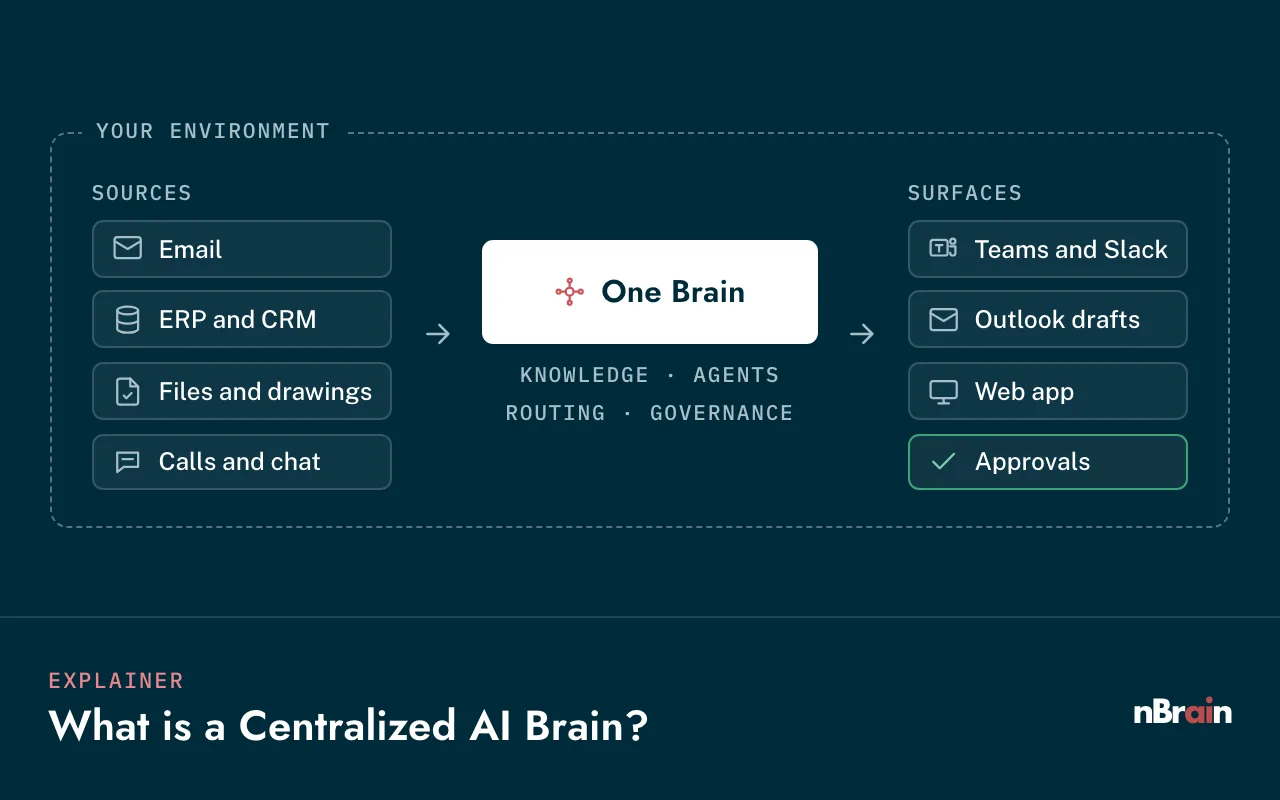
Your systems feed one knowledge layer. The Brain routes each task to the right model and works inside the tools your people already use, under the rules you set.
Step 01
Deploy
Stood up in your own cloud tenant, or on your own servers.
Your sign-in and roles
Encryption in transit and at rest
Data never trains public models
Step 02
Connect
Email, calendars, call recordings, documents, CRM, and practice management, read-only by default.
Microsoft 365 or Google Workspace
CRM, PSA, and billing systems
Document management and file shares
Step 03
Act, with approval
Agents draft recaps, proposals, updates, and tasks. A person approves anything a client sees.
Approval queues by role
Sources on every answer
Low-confidence answers flagged
Step 04
Measure and expand
We take a baseline in month one, then add the next workflow on the same data and permissions.
Your clients trust you with their information. The Brain keeps it that way.
The first question firms ask isn't "what can it do?" It's "can one client's work ever show up in another client's answer?" These controls are built in from the first week.
Client-by-client permissions
Access follows engagement staffing and mirrors your existing sign-in, checked on every request.
Ethical walls respected
Conflicted matters and restricted clients stay walled off, from search, drafting, and every agent.
A person approves client output
Recaps, proposals, reports, and emails wait in a queue until the right person approves them.
A full audit trail
Which data, which model, which person, and which action, recorded every time.
Your data never trains public models
Model calls run through enterprise endpoints that don't train on your data, or through models hosted inside your environment.
Your cloud or on-premisesEngagement-level accessRole-based accessEncryption in transit and at restFull audit trailData never trains public models
Most of these run inside nBrain today. Each agent has one job, a defined set of tools, and guardrails on what it can do, and they share the same data, permissions, and audit trail.
Sales
Call recap writer
Turns a transcript into a recap in your format, ready to review.
Sales
Proposal and SOW drafter
Writes from the calls, your pricing rules, and your past wins.
Proposals
RFP compliance matrix
Pulls every requirement and maps it to a response section.
Delivery
Commitment tracker
Finds promises in meetings and email and files them as tasks.
Delivery
Client update writer
Drafts weekly and monthly updates from the work itself.
Operations
CRM keeper
Files every email, call, and document on the right record.
Finance
Time and billing assistant
Suggests time entries and checks invoices against the engagement.
Knowledge
Engagement search
Cited answers from past work, limited to what each person may see.
Yes. Our sales, proposals, client reporting, CRM, task tracking, marketing, and delivery all run on the same platform we build for clients. The videos on this page are recorded from it. When we build your Brain, you're getting what we use every day, set up around your firm.
Can one client's information end up in another client's answer?
Not if your permissions say it can't. Access is enforced on every request, based on who is staffed on which engagement, and conflicted or restricted matters can be walled off entirely. Every request is logged, so you can show a client exactly who accessed what.
What happens when the AI gets something wrong?
It will sometimes be wrong, so it's built for that. Answers show their sources, low-confidence answers are flagged, and anything a client will see waits for a person to approve it. Every step is logged, so you can see what happened and why.
Which models does it use?
The Brain is model-agnostic. It routes each task to the right model, such as GPT-6 Astra, Claude Opus 5.5, or Gemini 4 Argon, or to open-source models hosted inside your environment for the most sensitive work. You decide which models may see which data.
Will it fit our practice management, billing, and document systems?
Usually, yes. The Brain connects through native connectors, APIs, and direct read-only database connections to Microsoft 365, Google Workspace, CRMs, document management, and billing systems. Anything without a connector is built as part of the engagement.
Does this cut into billable hours?
It cuts the hours you can't bill: notes, status updates, proposals, data entry, and searching for past work. Most firms put that time back into client work, take on more clients per person, or move toward fixed-fee pricing where speed becomes margin.
Where should a firm start?
With one high-volume workflow that eats senior time, usually call recaps and proposals, or client reporting. We take a baseline in month one and measure hours returned, then add the next workflow on the same foundation.
Who owns it?
You do. The platform, the code, the data, and the configurations live in your environment and your repository. We build and operate it with you, and you can take it fully in-house at any time.
In one strategy session we map where a Brain would give your people the most time back, starting with the workflows that cost your senior people the most hours.